Description
-
Model List:
- Excavator Grade Guidance With Topcon
- 1. Contents
- 1.0.1. Recognize Safety Information
- 1.0.2. Follow Safety Instructions
- 1.0.3. Operate Only If Qualified
- 1.0.4. Wear Protective Equipment
- 1.0.5. Avoid Unauthorized Machine Modifications
- 1.0.6. Prevent Fires
- 1.0.7. Decommissioning Proper Recycling and Disposal of Fluids and Components
- 1.0.8. Notes About Making Settings
- 1.0.9. Warnings About Using Height Detection
- 1.0.10. Positional Awareness While Operating
- 1.0.11. Do Not Look Directly at a Laser
- 1.0.12. Precautions for Disassembling and Assembling
- 1.0.13. Securing the Monitor
- 1.1. OperationOperators Station
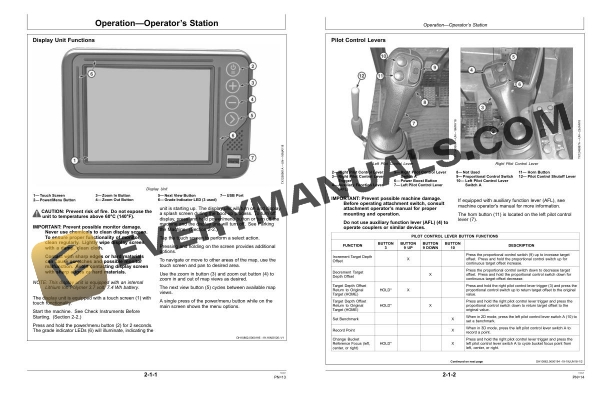
- 1.1.1. Display Unit Functions
- 1.1.2. Pilot Control Levers
- 1.2. OperationOperating the Machine
- 1.2.1. Before Starting Work
- 1.2.2. Inspect Machine Daily Before Starting
- 1.2.3. Check Instruments Before Starting
- 1.2.4. Parking the Machine
- 1.3. OperationOperator Interface Display
- 1.3.1. Display Unit StartUp
- 1.3.2. Keyboard Functions
- 1.3.3. Changing Language
- 1.3.4. Changing Screen Brightness
- 1.3.5. File Menu
- 1.3.6. File MenuProjects
- 1.3.7. File MenuControl
- 1.3.8. File MenuLayers
- 1.3.9. File MenuPoints
- 1.3.10. Surface File Types
- 1.3.11. Import a Surface File From a Project File
- 1.3.12. Creating Flat or Sloping Surface Files
- 1.3.13. Creating Crown Road Surface Files
- 1.3.14. Creating Triangulated Surfaces From a Topo Survey File
- 1.3.15. Raising or Lowering an Existing Surface
- 1.3.16. Subgrade an Existing Alignment
- 1.3.17. File MenuActive
- 1.3.18. Control Menu
- 1.3.19. Control MenuMachine Setup
- 1.3.20. Control MenuAsBuilt Control
- 1.3.21. Control MenuElevation Reference
- 1.3.22. Control MenuAttachment
- 1.3.23. Control Menu3D/2D Control
- 1.3.24. Control MenuRestart Connection
- 1.3.25. Tools Menu
- 1.3.26. Tools MenuConfigure Radios
- 1.3.27. Tools MenuPosition Check
- 1.3.28. Tools MenuNavigate
- 1.3.29. Tools MenuTopo Survey
- 1.3.30. Tools MenuData Logging
- 1.3.31. Tools MenuSupervisor
- 1.3.32. View Menu
- 1.3.33. Changing the Window Display Types
- 1.3.34. View MenuDisplay Options
- 1.3.35. View MenuAbout 3DMC
- 1.4. MiscellaneousOther Options
- 1.4.1. Isolating a Surface
- 1.4.2. GPS Information
- 1.4.3. Add/Edit Attachment
- 1.4.4. Adding or Editing Radio Channels
- 1.5. MiscellaneousTroubleshooting
- 1.5.1. RTK Communication Problems
- 1.5.2. Display Problems
- 1.5.3. GPS Localization Problems
- 1.6. MiscellaneousMachine Numbers
- 1.6.1. Record Display Unit Serial Number
- 1.6.2. Record MCX1 Controller Serial Number
- 1.6.3. Record Radio Receiver Serial Number
- 1.6.4. Record Body Sensor Serial Number
- 1.6.5. Record Boom Sensor Serial Number
- 1.6.6. Record Arm Sensor Serial Number
- 1.6.7. Record Bucket Sensor Serial Number
- 1.6.8. Record Laser Catcher Serial NumberIf Equipped
- 1.6.9. Record Global Navigation Satellite System (GNSS) Antenna Serial NumbersIf Equipped
- 1.6.10. Keep Proof of Ownership
- 2. Page Number
- 2.1. Section 11
- 2.2. Section 21
- 2.3. Section 22
- 2.4. Section 23
- 2.5. Section 41
- 2.6. Section 42
- 2.7. Section 43