Description
-
Model List:
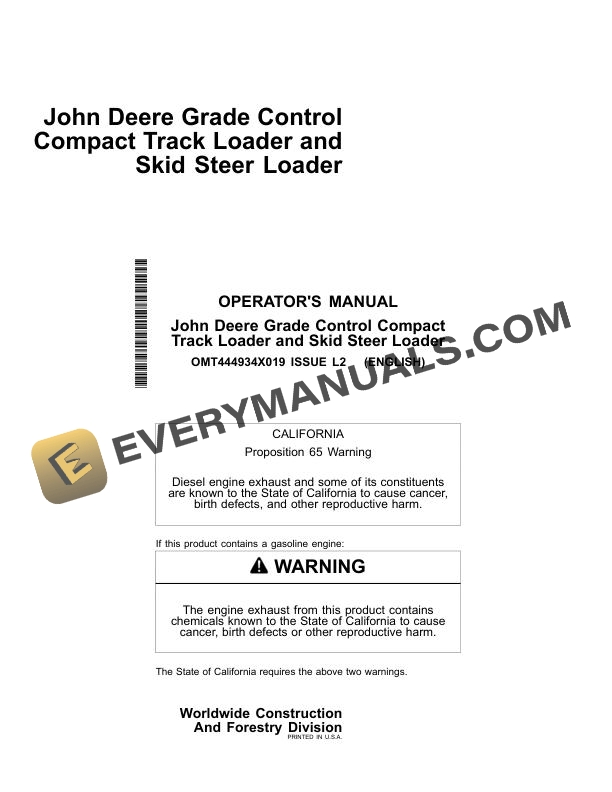
- Grade Control Compact Track Loader and Skid Steer Loader
- 1. Contents
- 1.0.1. Recognize Safety Information
- 1.0.2. Follow Safety Instructions
- 1.0.3. Operate Only If Qualified
- 1.0.4. Wear Protective Equipment
- 1.0.5. Do Not Look Directly at a Laser
- 1.0.6. Avoid Unauthorized Machine Modifications
- 1.0.7. Prevent Fires, Clean Debris From Machine
- 1.0.8. Decommissioning Proper Recycling and Disposal of Fluids and Components
- 1.1. OperationOperators Station
- 1.1.1. Gauges and Indicators
- 1.1.2. Grade Control Display Unit
- 1.1.3. Real Time Kinematic (RTK) Antenna
- 1.1.4. Rear Camera Display Unit Functions
- 1.1.5. Rear Camera Display UnitMain Menu
- 1.1.6. Rear Camera Display UnitMain MenuDisplay Settings
- 1.2. OperationOperating the Machine
- 1.2.1. Before Starting Work
- 1.2.2. Inspect Machine Daily Before Starting
- 1.2.3. Check Instruments Before Starting
- 1.2.4. Parking the Machine
- 1.2.5. Dozer Mode and Dozer Blade Operation
- 1.3. OperationSmartGrade Operator Interface Display
- 1.3.1. Grade Control Display Unit Functions
- 1.3.2. Keyboard Functions
- 1.3.3. Changing Language
- 1.3.4. Changing Screen Brightness and Speaker Volume
- 1.3.5. Changing the Grade Indicator Scale
- 1.3.6. Data Menu
- 1.3.7. Data MenuProjects
- 1.3.8. Data MenuControl
- 1.3.9. Data MenuLayers
- 1.3.10. Data MenuPoints
- 1.3.11. Data MenuSurfaces
- 1.3.12. Data MenuActive
- 1.3.13. Data MenuImport/Export
- 1.3.14. Surface File Types
- 1.3.15. Creating Flat or Sloping Surface Files
- 1.3.16. Creating Crown Road Surface Files
- 1.3.17. Creating Triangulated Surfaces From a Topo Survey File
- 1.3.18. Raising or Lowering an Existing Surface
- 1.3.19. Subgrade an Existing Alignment
- 1.3.20. Control Menu
- 1.3.21. Control MenuMachine Setup
- 1.3.22. Control MenuBlade Control
- 1.3.23. Control MenuIMU Calibration
- 1.3.24. Control MenuControl Settings
- 1.3.25. Control MenuBlade Wear
- 1.3.26. Control MenuRestart Connection
- 1.3.27. Tools Menu
- 1.3.28. Tools MenuConfigure Radios
- 1.3.29. Tools MenuPosition Check
- 1.3.30. Tools MenuNavigate
- 1.3.31. Tools MenuTopo Survey
- 1.3.32. Tools MenuSupervisor Mode
- 1.3.33. View Menu
- 1.3.34. View MenuLayout
- 1.3.35. View MenuDisplay Options
- 1.3.36. Working Surface Display Options
- 1.3.37. Alignment Display Options
- 1.3.38. Point Display Options
- 1.3.39. Direction of Travel Options
- 1.3.40. Machine Image Options
- 1.3.41. Enable/Disable Shortcut Buttons
- 1.3.42. Changing Background Color
- 1.3.43. Display Units Options
- 1.3.44. View MenuAbout
- 1.4. SmartGrade Remote Support Website
- 1.4.1. At a Glance (Support Desk)
- 1.4.2. Accessing the Remote Support Website
- 1.4.3. Managing Remote Support Account Access
- 1.4.4. Viewing, Filtering, and Sorting Paired Client Devices
- 1.4.5. Finding the Remote Support Desk Number
- 1.4.6. Configuring the Remote Support Desk
- 1.4.7. Managing Pairings
- 1.4.8. Providing Support
- 1.4.9. Remote View
- 1.4.10. Remote Control
- 1.4.11. Remote File Management
- 1.4.12. Remote MCX Configuration
- 1.4.13. Responding to Support Requests
- 1.4.14. Providing Unsolicited Support
- 1.5. SmartGrade Remote Support OnMachine Client
- 1.5.1. At a Glance (Client Device)
- 1.5.2. Opening Client Device Menu
- 1.5.3. Pairing to a Support Desk
- 1.5.4. Editing Pairing Tags
- 1.5.5. Reviewing and Modifying Support Desk Pairing
- 1.5.6. Request Support
- 1.5.7. Specifying Optional Dates and Times to Receive Support
- 1.5.8. Closing Support Requests
- 1.5.9. Viewing and Terminating Active Support Sessions
- 1.5.10. Unpairing From a Support Desk
- 1.5.11. Usage of Remote Support
- 1.5.12. Basic Remote Support Troubleshooting
- 1.6. Operation2D Slope Control Operator Interface Display
- 1.6.1. Slope Control Runtime Screen
- 1.6.2. Main MenuSlope Control
- 1.6.3. Slope Control Settings Screen
- 1.6.4. Square Blade Function
- 1.6.5. Slope Control Modes
- 1.6.6. Enable or Disable Cross Slope Display
- 1.6.7. Enable of Disable Mainfall Slope Display
- 1.6.8. Manually Set Desired Target Cross Slope and Target Mainfall Slope Display ValuesTarget Mode Only
- 1.6.9. Flip SlopeTarget Mode Only
- 1.6.10. Match SlopeTarget Mode Only
- 1.6.11. Inc/Dec Mode
- 1.6.12. Mainfall Offset Adjustment
- 1.7. Operation2D Laser Interface Display
- 1.7.1. Laser SystemTheory of Operation
- 1.7.2. Laser SystemDaily Set Up
- 1.7.3. Laser DisplayRuntime Screen
- 1.7.4. Laser DisplayLaser Position Ranges and Arrows
- 1.7.5. Main MenuLaser Control
- 1.7.6. Laser Settings Screen
- 1.7.7. Laser SystemSetting Grade
- 1.7.8. Laser DisplayInc/Dec Offset Feature
- 1.8. MiscellaneousSmartGrade Other Options
- 1.8.1. Isolating a Surface
- 1.8.2. Steering/Grading to Polyline
- 1.8.3. GNSS Information
- 1.8.4. Elevation Control Button
- 1.8.5. Slope Control Button
- 1.8.6. Adding and Editing Radio Channels
- 1.9. MiscellaneousSmartGrade Troubleshooting
- 1.9.1. RTK Communication Troubleshooting
- 1.9.2. Grade Control Display Unit Troubleshooting
- 1.9.3. Inertial Measurement Unit (IMU) Troubleshooting
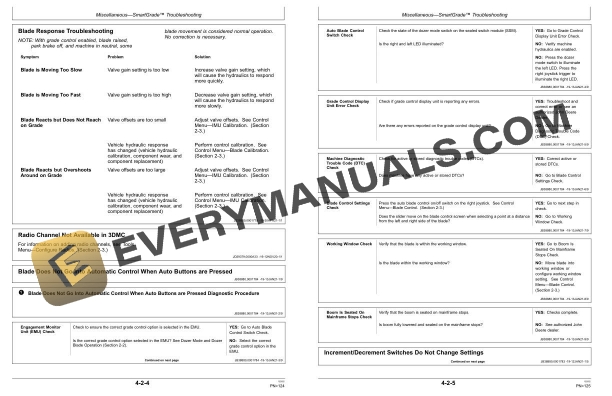
- 1.9.4. Blade Response Troubleshooting
- 1.9.5. Radio Channel Not Available in 3DMC
- 1.9.6. Blade Does Not Go Into Automatic Control When Auto Buttons are Pressed
- 1.9.6.1. Blade Does Not Go Into Automatic Control When Auto Buttons are Pressed Diagnostic Procedure
- 1.9.7. Increment/Decrement Switches Do Not Change Settings
- 1.9.7.1. Increment/Decrement Switches Do Not Change Settings Diagnostic Procedure
- 1.9.8. Surface Is Not Available Under File >> Active >> Surface Menu
- 1.9.8.1. Active Surface Not Available Diagnostic Procedure
- 1.9.9. System Keeps Coming Out of Auto When the Blade is Moved Manually
- 1.9.9.1. System Keeps Coming Out of Auto When the Blade is Moved Manually Diagnostic Procedure
- 1.9.10. Machine is Off by About 0.10 ft (30 mm) Vertically
- 1.9.10.1. Machine is Off by About 0.10 ft (30 mm) Vertically
- 1.10. Miscellaneous2D Slope Control Troubleshooting
- 1.10.1. Rear Camera Display Unit Troubleshooting
- 1.10.2. Blade Position Troubleshooting
- 1.11. Miscellaneous2D Laser Troubleshooting
- 1.11.1. Rear Camera Display Unit Troubleshooting
- 1.11.2. Laser Receiver and Laser Base Station Troubleshooting
- 1.11.3. Blade Response Troubleshooting
- 1.12. MiscellaneousSmartGrade Machine Numbers
- 1.12.1. Record Grade Control Display Unit Serial Number
- 1.12.2. Record Grade Control Controller Serial Number
- 1.12.3. Record Controller Area Network (CAN) Gateway Controller Serial Number
- 1.12.4. Record Real Time Kinematic (RTK) Radio Serial Number
- 1.12.5. Record Global Navigation Satellite System (GNSS) Antenna Serial Numbers
- 1.12.6. Record Real Time Kinematic (RTK) Antenna Serial Number
- 1.12.7. Record Bluetooth and WiFi Antenna Serial Number
- 1.12.8. Record Inertial Measurement Unit (IMU) Serial Numbers
- 1.12.9. Keep Proof of Ownership
- 1.13. Miscellaneous2D Slope Control and 2D Laser Machine Numbers
- 1.13.1. Record Controller Area Network (CAN) Gateway Controller Serial Number
- 1.13.2. Record Inertial Measurement Unit (IMU) Serial Numbers
- 1.13.3. Record 2D Laser Components Serial NumbersIf Equipped
- 1.13.4. Keep Proof of Ownership
- 2. Page Number
- 2.1. Section 11
- 2.2. Section 21
- 2.3. Section 22
- 2.4. Section 23
- 2.5. Section 24
- 2.6. Section 25
- 2.7. Section 26
- 2.8. Section 27
- 2.9. Section 41
- 2.10. Section 42
- 2.11. Section 43
- 2.12. Section 44
- 2.13. Section 45
- 2.14. Section 46