Description
-
Model List:
- Timbermatic Maps
- 1. Contents
- 1.0.1. Recognize Safety Information
- 1.0.2. Follow Safety Instructions
- 1.0.3. Operate Only If Qualified
- 1.0.4. Wear Protective Equipment
- 1.0.5. Avoid Unauthorized Machine Modifications
- 1.0.6. Prevent Fires
- 1.0.7. Decommissioning Proper Recycling and Disposal of Fluids and Components
- 1.1. OperationTimberMatic Maps Monitor Operation
- 1.1.1. Using the Display
- 1.1.2. Main Display and Functions
- 1.1.3. Creating Stems and BunchesFeller Bunchers Only
- 1.1.4. SitesSITE MANAGEMENT
- 1.1.5. SitesCREATE SITE
- 1.1.6. SitesEDIT SITE
- 1.1.7. SitesSITE STATISTICS
- 1.1.8. SitesSITE ACTIONS
- 1.1.9. Map Management
- 1.1.10. SettingsGENERAL
- 1.1.11. SettingsMACHINE PAIRING
- 1.1.12. SettingsMAP ITEMS
- 1.1.13. SettingsMISCELLANEOUS
- 1.1.14. System Info
- 1.1.15. Remote Access
- 1.1.16. Measure Menu
- 1.1.17. Create Route Menu
- 1.1.18. Create Place of Interest Menu
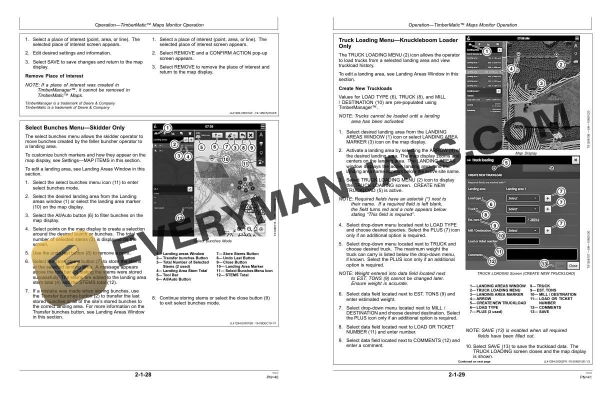
- 1.1.19. Select Bunches MenuSkidder Only
- 1.1.20. Truck Loading MenuKnuckleboom Loader Only
- 1.1.21. Landing Areas Window
- 1.1.22. Layers Window
- 1.1.23. Site Statistics Window
- 1.1.24. Messaging/File Management Window
- 1.1.25. Alarms WindowIf Enabled
- 1.2. MiscellaneousMachine Numbers
- 1.2.1. Record TimberMatic Maps Display Unit Serial Number
- 1.2.2. Keep Proof of Ownership
- 1.3. MiscellaneousTroubleshooting
- 1.3.1. TimberMatic Maps Display Unit Problems
- 1.3.2. TimberMatic Maps Communication Problems
- 2. Page Number
- 2.1. Section 11
- 2.2. Section 21
- 2.3. Section 41
- 2.4. Section 42