Description
-
Model List:
- 200X
- 200CX Loader
- 1. Contents
- 1.0.1. Recognize Safety Information
- 1.0.2. Understand Signal Words
- 1.0.3. Follow Safety Instructions
- 1.0.4. Protect People and Animals
- 1.0.5. Help Prevent Rollovers
- 1.0.6. Avoid Injury or Death from Rollover Accidents
- 1.0.7. Avoid Power Lines
- 1.0.8. Dig Safely
- 1.0.9. Detach Loader Safely
- 1.0.10. Keep Riders Off Machine
- 1.0.11. Operate Bucket/Attachment Safely
- 1.0.12. Carry Materials Safely
- 1.0.13. Safe Loader Operation on Slopes
- 1.0.14. Driving on Public Roads
- 1.0.15. Service Loader Safely
- 1.0.16. Check Hoses for Damage
- 1.0.17. Avoid HighPressure Fluids
- 1.0.18. Store Attachments Safely
- 1.1. Safety Signs
- 1.1.1. Replace Safety Signs
- 1.1.2. Safety Sign Locations
- 1.2. Prepare the Tractor
- 1.2.1. Approved Tractors
- 1.2.2. Using RollOver Protective Structure (ROPS)
- 1.2.3. Keep ROPS Installed Properly
- 1.2.4. Remove Front Weights
- 1.2.5. Approved Front Tires
- 1.2.6. Inflating Front Tires
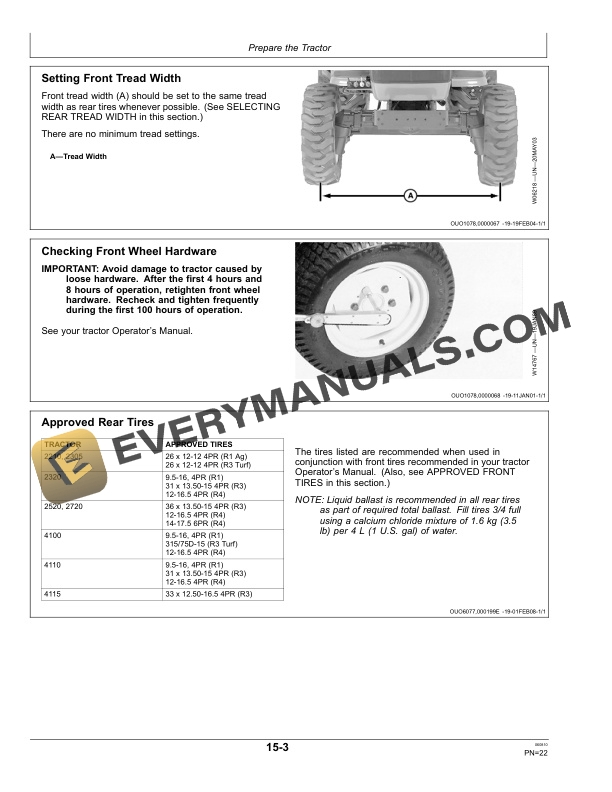
- 1.2.7. Setting Front Tread Width
- 1.2.8. Checking Front Wheel Hardware
- 1.2.9. Approved Rear Tires
- 1.2.10. Selecting Rear Tread Width
- 1.2.11. Required Minimum Tractor Ballast
- 1.2.12. Adding Ballast to Rear Wheels
- 1.2.13. Installing Hitch Pin Bushings on Ballast Box for Category 1 Quic
- 1.2.14. Attaching Ballast Box to Tractor with ThreePoint Hitch
- 1.2.15. Attaching Ballast Box to Tractor with Quick Coupler Hitch
- 1.2.16. Adding Ballast to 3Point Hitch
- 1.3. Detach Loader
- 1.3.1. Remove Ballast Box
- 1.3.2. Detach Loader
- 1.4. Attach Loader
- 1.4.1. Prepare to Attach Loader
- 1.4.2. Attach Loader
- 1.4.3. Checking Loader Operation
- 1.5. Transport
- 1.5.1. Carrying Loads
- 1.5.2. Keep Riders Off Machine
- 1.5.3. Driving on Public Roads
- 1.6. Operate Loader
- 1.6.1. Preoperating Checks
- 1.6.2. Using Ballast Box
- 1.6.3. Avoid Rollover Accidents
- 1.6.4. Do Not Handle Round or Large Square Bales
- 1.6.5. Use Bucket Level Indicator
- 1.6.6. Leveling and Scraping Forward
- 1.6.7. Leveling in Reverse
- 1.6.8. Carrying Material
- 1.6.9. Removing Material from a Pile
- 1.6.10. Loading Operations
- 1.6.11. Digging
- 1.6.12. Backfilling
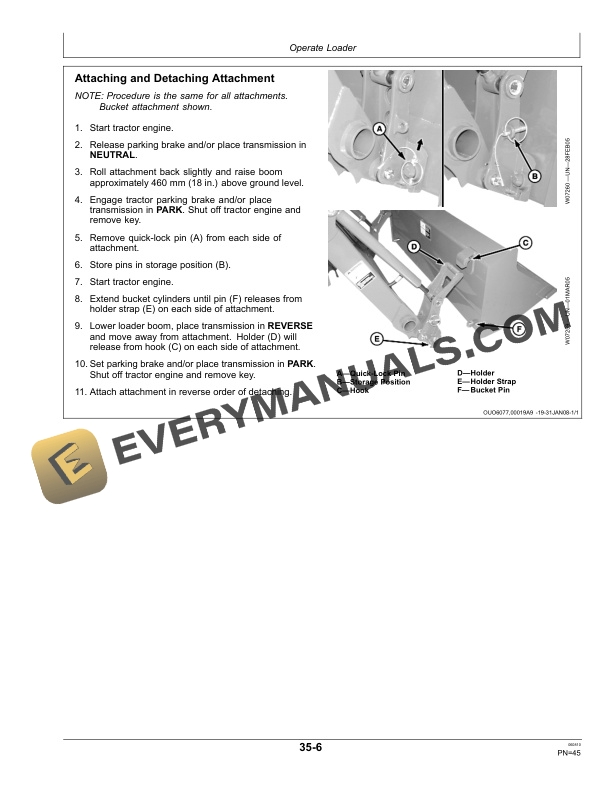
- 1.6.13. Attaching and Detaching Attachment
- 1.6.14. Attach and Detach Pin On Bucket Option
- 1.6.15. Attachments Available
- 1.7. Lubrication and Maintenance
- 1.7.1. Lubricating and Maintaining Loader Safely
- 1.7.2. Perform Lubrication and Maintenance
- 1.7.3. Observe Lubrication Symbols
- 1.7.4. Alternative and Synthetic Lubricants
- 1.7.5. First 10 Hours
- 1.7.6. Every 10 Hours
- 1.7.7. Every 50 Hours
- 1.8. Service
- 1.8.1. Servicing Loader and/or Tractor Safely (Loader Attached)
- 1.8.2. Keep Service Area Clean
- 1.8.3. Avoid HighPressure Fluids
- 1.8.4. ORing Installation
- 1.8.5. Tightening Procedure for Fittings
- 1.8.6. Access Front of Tractor (2210, 2305, 2320, 2520 and 2720 Tractor
- 1.8.7. Identifying Hose Connections
- 1.8.8. Replacing Orifice
- 1.8.9. Adjust Bucket Level Indicator200CX
- 1.8.10. Metric Bolt and Screw Torque Values
- 1.8.11. Unified Inch Bolt and Screw Torque Values
- 1.9. Assembly
- 1.9.1. Perform Predelivery Service Safely
- 1.9.2. Installation Instructions Available Online to John Deere Dealers
- 1.9.3. Prepare For Assembly
- 1.9.4. Recommended Set Up/Assembly Sequence
- 1.9.5. Prepare the Tractor
- 1.9.6. Prepare the Loader
- 1.9.7. Install Optional Pin On Bucket
- 1.9.8. Prepare Loader For Attachment To Tractor
- 1.9.9. Final Inspection and Adjustments
- 1.9.10. Install Optional Equipment/Attachments
- 1.10. John Deere Service Keeps You On The Job
- 1.10.1. John Deere Is At Your Service
- 2. Page Number
- 2.1. Section 05
- 2.2. Section 10
- 2.3. Section 15
- 2.4. Section 20
- 2.5. Section 25
- 2.6. Section 30
- 2.7. Section 35
- 2.8. Section 40
- 2.9. Section 45
- 2.10. Section 50