Description
-
Model List:
- 580H Material Collection System
- 580L Material Collection System
- 1. Introduction
- 1.1. Using Your Operators Manual
- 1.2. Machine Use
- 2. Product Identification
- 2.1. Product Compatibility
- 2.1.1. Equipment Configurations For Each Tractor Model
- 2.2. Record Identification Numbers
- 2.3. Additional Equipment
- 3. Safety Labels
- 3.1. Pictorial Safety Signs
- 3.2. Operators Manual
- 3.3. Avoid Injury from Crushing
- 3.4. Avoid Injury from Crushing
- 3.5. Avoid Injury from Crushing
- 3.6. Avoid Injury from Rotating Blower
- 3.7. Take Proper Safety Precautions
- 3.8. Thrown Objects
- 3.9. Operating Safely
- 3.9.1. Before bag removal or installation
- 3.9.2. Before backing up machine
- 3.9.3. Operate safely on slopes
- 3.9.4. Bag Maintenance
- 3.10. Parking Safely
- 3.11. Protect Children
- 3.12. Avoid Injury From Thrown Objects
- 3.13. Avoid Injury From Rotating Blades
- 3.14. Practice Safe Maintenance
- 3.15. Using the Lift Cylinder Safety Lock
- 3.16. Avoid High Pressure Fluids
- 4. Assembly
- 4.1. Prepare MCS for Assembly
- 4.2. Assemble Connecting Plates to MCS (X Series)
- 4.3. Assemble Draft Link Rod to MCS (2000/3000 TWENTY Series)
- 4.4. Install Fill Gage
- 4.5. Install Light Kit (Optional)
- 4.6. Install Caster Wheel Assemblies (2000/3000 TWENTY Series Only)
- 5. Preparing Vehicle
- 5.1. Ballast
- 5.2. RollOver Protection
- 5.3. Rear PTO
- 5.4. Rear Hydraulic Components
- 5.5. Install Intake Unit Retainer
- 5.5.1. Rotary Mower 1.22 m (48 in.), 1.37 m (54 in.) and 1.57 m (62 in.)
- 5.5.2. Rotary Mower 1.53 m (60 in.)
- 5.5.3. Rotary Mower 1.53 m (60 in.) for 4000 Series Tractors
- 5.5.4. Rotary Mower 1.85 m (72 in.)
- 5.6. Install Connecting Plates and Rod (X700 Series Without ThreePoint HItch)
- 5.7. Remove Center Link, Draft and Lift Links (X700 Series With Three Point Hitch)
- 5.8. Install Rear Hydraulic Kit (X700 Series)
- 6. Installing
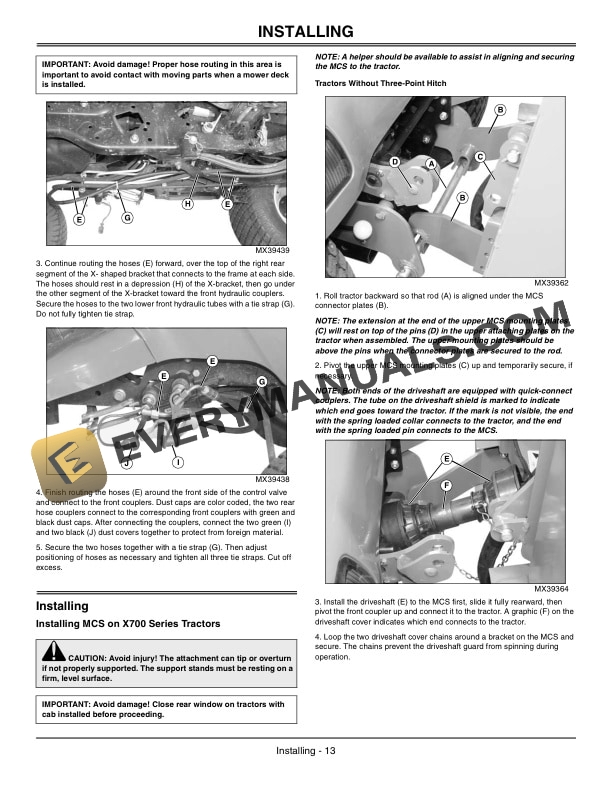
- 6.1. Installing MCS on X700 Series Tractors
- 6.1.1. Tractors Without ThreePoint Hitch
- 6.1.2. Tractors With ThreePoint Hitch
- 6.2. Installing MCS on 2000/3000 TWENTY SeriesTractors
- 6.3. Adjust Length of UJoint Protection Tubes
- 6.4. Install Intake Unit and Suction Tube
- 7. Removing and Storing
- 7.1. Remove MCS From Machine X700 Series Tractors
- 7.2. Remove MCS From Machine 2000/3000 TWENTY Series Tractors
- 7.3. Storing Attachment
- 8. Operating
- 8.1. Checking PTO Speed and Direction of Rotation
- 8.2. Driving Machine With Material Collection System (MCS)
- 8.3. Using MCS (Engaging and Disengaging)
- 8.3.1. Engaging MCS
- 8.3.2. Disengaging MCS
- 8.4. Emptying Material Collection System (LowDump System)
- 8.5. Emptying Material Collection System (HighDump System)
- 8.6. Transporting
- 8.7. Unplugging Mower, Bagger, Material Collection System
- 8.7.1. Checking For Plugging While Driving
- 8.7.2. Removing Debris From Inspection Points
- 9. Service
- 9.1. Fan Wheel
- 9.2. Hydraulic System
- 9.3. Clean the MCS
- 9.4. Using Safety Interlock When Container is in Elevated Position
- 9.4.1. Using Safety Interlock when elevated
- 9.4.2. Using Safety Interlock with Open Hopper
- 9.5. Checking Drive Belt Tension
- 9.6. Adjust Drive Belt Tension
- 9.7. Checking Tire Pressure (If equipped)
- 9.8. Remove Hopper
- 9.9. Install Hopper
- 9.10. Adjusting Hopper Lock
- 9.11. Lubrication
- 9.11.1. General Information
- 9.11.2. Lubrication Daily
- 9.11.3. Lubrication Weekly
- 9.12. Disassembly / Disposal
- 9.13. Modification of MCS
- 10. Troubleshooting
- 10.1. Using Troubleshooting Chart
- 10.2. Troubleshooting
- 11. Specifications
- 11.1. Model 580L With Support Stands and 500 Litre Hopper
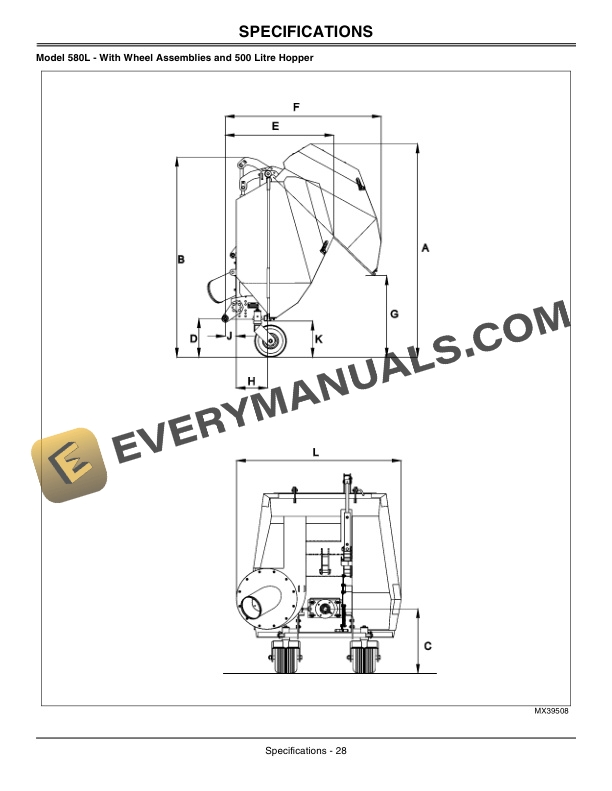
- 11.2. Model 580L With Wheel Assemblies and 500 Litre Hopper
- 11.3. Model 580L With Wheel Assemblies and 750 Litre Hopper
- 11.4. Model 580H With Support Stands and 500 Litre Hopper
- 11.5. Model 580H With Wheel Assemblies and 500 Litre Hopper
- 11.6. Model 580H With Wheel Assemblies and 750 Litre Hopper
- 12. Getting Quality Service
- 12.1. Service Literature
- 12.1.1. Order Service Parts Online
- 12.2. John Deere Quality Continues with Quality Service
- 13. Declaration of Conformity
- 13.1. Declaration of Conformity
- 13.2. Declaration of Conformity
- 14. Certificate of Conformity
- 14.1. Certificate of Conformity
- 14.1.1. Cutting unit rpm
- 14.2. Certificate of Conformity
- 14.2.1. Cutting unit rpm