Description
-
Model List:
- AutoTrac Universal (ATU)
- 1. Contents
- 1.0.1. Recognize Safety Information
- 1.0.2. Understand Signal Words
- 1.0.3. Follow Safety Instructions
- 1.0.4. Practice Safe Maintenance
- 1.0.5. Use Steps and Handholds Correctly
- 1.0.6. Handle Electronic Components and Brackets Safely
- 1.0.7. Use Electronic Display Properly
- 1.0.8. Operate Guidance Systems Safely
- 1.0.9. Use Seat Belt Properly
- 1.0.10. Operate AutoTrac Universal Safely
- 1.1. Safety Signs
- 1.1.1. AutoTrac Detected
- 1.2. Regulatory and Compliance Information
- 1.2.1. EC Declaration of Conformity
- 1.2.2. Identify Date Code
- 1.2.3. Customs UnionEAC (English, Russian, and Kazakh)
- 1.2.4. Toxic or Hazardous Substances or Elements Disclosure
- 1.3. System Overview
- 1.3.1. Theory of Operation
- 1.3.2. AutoTrac Universal Requirements
- 1.3.3. AutoTrac Accuracy
- 1.3.4. AutoTrac Status Pie
- 1.4. System OverviewSoftkey Legend
- 1.4.1. Application Controller 1100Setup Softkey
- 1.4.2. Application Controller 1100Main Softkey
- 1.4.3. GreenStarMapping Softkey
- 1.4.4. GreenStarGuidance Softkey
- 1.4.5. StarFire ReceiverStarFire Softkey
- 1.4.6. StarFire ReceiverRTK Softkey
- 1.4.7. StarFire ReceiverSatellite Softkey
- 1.4.8. StarFire ReceiverDiagnostics Softkey
- 1.5. Component Overview
- 1.5.1. StarFire Receiver
- 1.5.2. GreenStar Display
- 1.5.3. AutoTrac Universal
- 1.5.4. Internal and External Resume Switch
- 1.5.5. Integrated Resume Switch (W110 and W150 Windrowers Only)
- 1.5.6. Operator Presence
- 1.6. Setting Up
- 1.6.1. Configure AutoTrac Universal
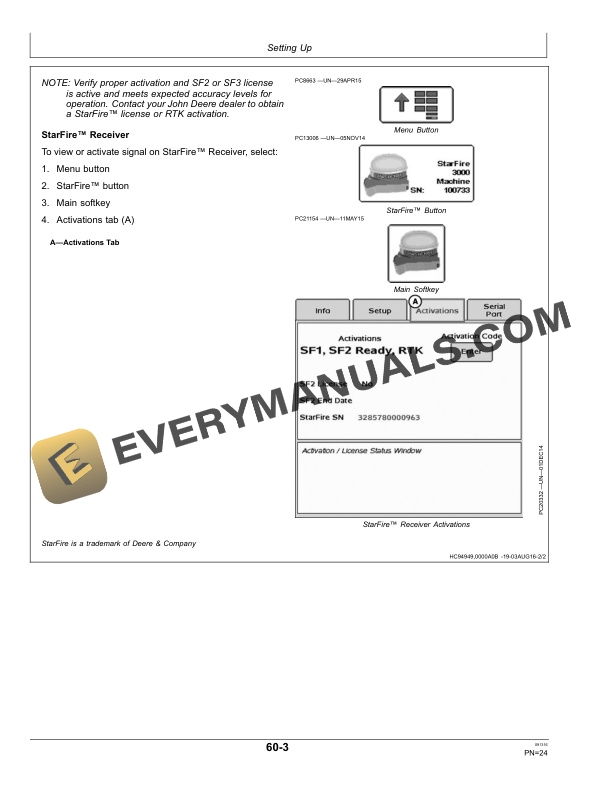
- 1.6.2. GreenStar Display and StarFire Receiver Software Activations
- 1.6.3. StarFire Height and ForeAft
- 1.6.4. StarFire Height and ForeAft Measurements Table
- 1.6.5. Enter Machine Information and Offsets
- 1.6.6. Read and Accept Warning on GreenStar Display
- 1.6.7. Set Up GreenStar 3 2630 Display
- 1.6.8. Set Up GreenStar 2 2600 Display
- 1.6.9. Set Up GreenStar 2 1800 Display
- 1.6.10. Set Up Original GreenStar Display
- 1.6.11. Configure Steer Asymmetry
- 1.6.12. Set Up Terrain Compensation Module (TCM)
- 1.6.13. Calibrate Terrain Compensation Module (TCM)
- 1.6.14. Direction of Travel
- 1.7. OperatingAutoTrac Universal
- 1.7.1. Create Guidance Line
- 1.7.2. Enable AutoTrac
- 1.7.3. Activate System
- 1.7.4. Deactivate System
- 1.8. OperatingOptimizing AutoTrac Universal
- 1.8.1. AutoTrac Settings
- 1.9. Troubleshooting
- 1.9.1. Diagnostic Readings
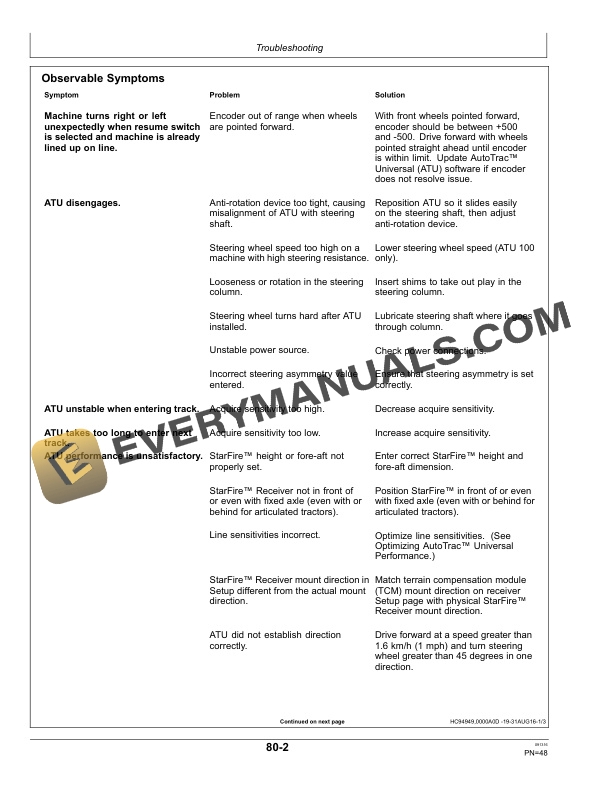
- 1.9.2. Observable Symptoms
- 1.9.3. Deactivation and Activation Thresholds
- 1.9.4. Stop CodesAutoTrac Universal
- 1.9.5. Guidance Warnings and InformationAutoTrac Universal
- 1.9.6. Trouble Code WarningsGuidance
- 1.9.7. ATU Diagnostic Trouble Code MessagesGS3 2630, GS2 2600, and GS2 2100 Displays
- 1.9.8. Alert PagesOriginal GreenStar Display
- 1.9.9. Diagnostic Trouble CodesOriginal GreenStar Display
- 1.9.10. Diagnostic Trouble CodesOriginal GreenStar Display
- 1.9.11. Original GreenStar Display
- 1.9.12. Mobile ProcessorOriginal GreenStar Display
- 1.9.13. Position ReceiverOriginal GreenStar Display
- 1.9.14. Fault CodesOriginal GreenStar Display
- 1.9.15. Warning ScreensOriginal GreenStar Display
- 1.10. Maintenance
- 1.10.1. Preseason Checklist
- 1.10.2. Postseason Checklist
- 1.10.3. Daily Checklist
- 1.11. John Deere Service Literature Available
- 1.11.1. Technical Information
- 1.12. John Deere Service Keeps You On Job
- 1.12.1. John Deere Is At Your Service
- 2. Page Number
- 2.1. Section 05
- 2.2. Section 10
- 2.3. Section 20
- 2.4. Section 30A
- 2.5. Section 30B
- 2.6. Section 40
- 2.7. Section 60
- 2.8. Section 70A
- 2.9. Section 70B
- 2.10. Section 80
- 2.11. Section 100