Description
-
Model List:
- Computer Trak 350 Monitors
- 1. Introduction
- 1.1. Trademarks
- 1.2. Foreword
- 1.3. A Message to Our Customers
- 1.4. Recognize Safety Information
- 1.5. Understand Signal Words
- 1.6. Follow Safety Instructions
- 1.7. Live With Safety
- 1.8. Prevent Machine Runaway
- 1.9. Prepare for Emergencies
- 1.10. Store Attachments Safely
- 1.11. Electrical Connections
- 1.12. Do Not Modify the Monitor or Radar Sensor
- 1.13. Replace Safety Signs
- 2. Safety Signs
- 2.1. Safety Signs
- 3. Attaching and Detaching
- 3.1. Attach and Detach Monitor
- 4. ComputerTrak 350 Monitor Setup
- 4.1. Monitor Display Representation
- 4.2. Preparing Monitors
- 4.3. Turn Console On
- 4.4. Set to English or Metric Units
- 4.5. Set Distance Calibration
- 4.6. Speed Set Mode
- 4.7. Enter Row Spacing
- 4.8. Enter Number of Rows
- 4.9. Turn Rows On and Off
- 4.10. Verify Implement Width
- 4.11. Set the High Population Limit
- 4.12. Set the Low Population Limit
- 4.13. Clear Area Counters 1 and 2
- 4.14. Turn Split Rows On and Off
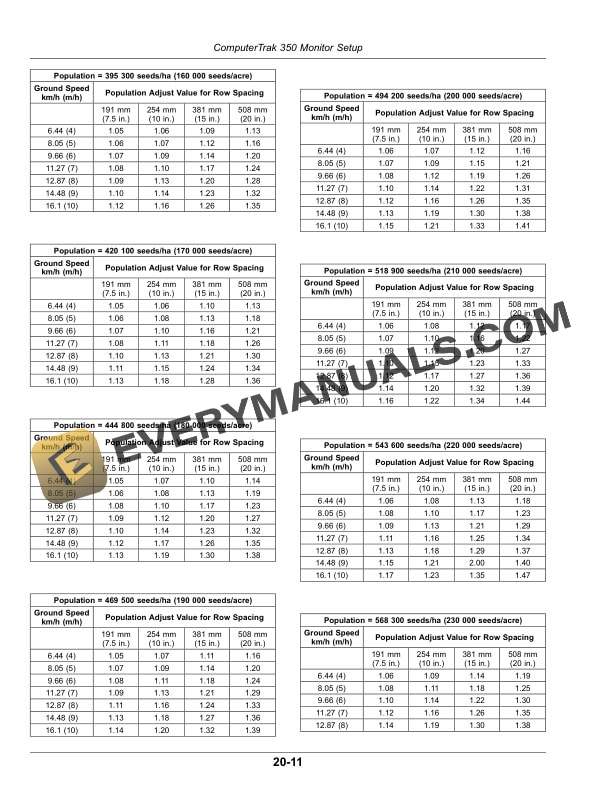
- 4.15. Use of PA (Population Adjust)
- 4.16. PA Chart Small Soybeans 8972 seeds/kg (4070 seeds per lb)
- 4.17. PA Chart Large Soybeans 4564 seeds/kg (2070 seeds per lb)
- 4.18. Use of FAVG (Fast Average)
- 4.19. Reset Constants
- 5. Operating ComputerTrak 350 Monitor
- 5.1. Turn Monitor On
- 5.2. Monitor Population and Seed Spacing
- 5.2.1. Scan Function
- 5.2.2. Minimum, Average, Maximum Function
- 5.2.3. Fast Average Function
- 5.2.4. Row Select Function
- 5.3. Monitor AreaSpeed
- 5.4. Seed Counter Mode
- 5.5. Distance Counter Mode
- 5.6. Row Failed Messages
- 5.7. Distance Failed Message
- 5.8. Display During Transporting or Turning
- 5.9. High or Low Population Warnings
- 5.10. Point Row Planting
- 5.11. Monitor Seed Spacing
- 5.12. View the Monitor History (Planter Mode)
- 6. Troubleshooting
- 6.1. Monitors
- 7. Service
- 7.1. Install and Remove Standard Flush Face Seed Tubes
- 7.2. Install and Remove NonStandard Seed Tubes
- 7.3. Clean Seed Tube Sensor
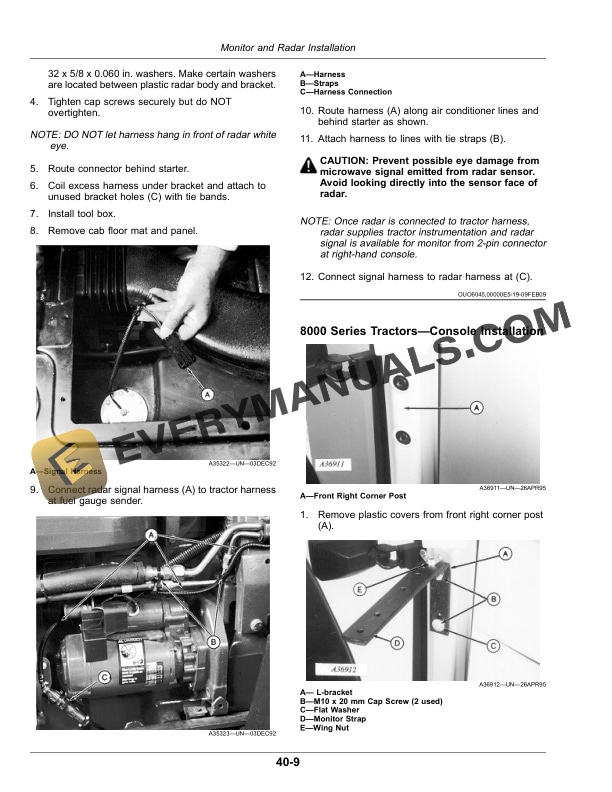
- 8. Monitor and Radar Installation
- 8.1. Series TractorsConsole Installation
- 8.2. Series Tractors with Exhaust Attached to CabRadar and Bracket Installation
- 8.3. Series Tractors with Exhaust on HoodRadar and Bracket Installation
- 8.4. Series TractorsConsole Installation
- 8.5. Install Radar Signal Adapter Harness 7000 Series Tractors Produced Prior to January 1993
- 8.6. Install Radar Signal Adapter Harness7000 Series Tractors Produced After January 1993
- 8.7. Series TractorsRadar and Bracket Installation
- 8.8. Series TractorsConsole Installation
- 8.9. Install Radar Signal Adapter Harness8000 and 8000T Series Tractor
- 8.10. Series TractorsRadar and Bracket Installation
- 8.11. Install Radar8000T Series Tractors
- 8.12. and 9000T Series TractorsConsole Installation
- 8.13. Install Radar Signal Adapter Harness9000 and 9000T Series Tractor
- 8.14. and 9000T Series TractorRadar and Bracket Installation
- 9. Seed Sensors
- 9.1. Installing Monitor Sensors455, 1520, and 1530
- 9.2. Install Monitor Sensors1560, 1590
- 9.3. Installing Seed Sensors1990
- 9.4. Install and Remove Standard Flush Face Seed Tubes
- 9.5. Install and Remove NonStandard Seed Tubes
- 10. Specifications
- 10.1. Specifications
- 10.2. Record Monitor Serial Number
- 10.3. Keep Proof of Ownership
- 10.4. Keep Machines Secure