Description
-
Model List:
- GreenStar – 7000 Series Forage Harvesters
- 1. Introduction
- 1.1. Foreword
- 1.2. John Deere Technical Information Bookstore
- 1.3. Trademarks
- 1.4. Predelivery Inspection
- 1.5. Before You Start
- 1.6. Recognize Safety Information
- 1.7. Understand Signal Words
- 1.8. Follow Safety Instructions
- 1.9. Practice Safe Maintenance
- 1.10. Use Steps and Handholds Correctly
- 1.11. Handle Electronic Components and Brackets Safely
- 2. Component Location
- 2.1. GreenStar 2 2600 and GreenStar 3 2630 Display
- 2.2. Feed Roll Potentiometer
- 2.3. HarvestLab Sensor
- 2.4. Feed Roll Speed Sensor
- 2.5. Control Unit
- 2.6. Integrated Printer (Option)
- 3. Operating GreenStar SystemSPFH
- 3.1. Read me First
- 3.2. Before You Start
- 3.3. Setup Integrated Printer (Option)
- 3.4. Setup Inoculant Dosing Device (Option)
- 3.5. GreenStar Forage HarvesterAutoLOC (Option)
- 3.6. GreenStar Forage HarvesterMapping
- 3.7. GreenStar Forage HarvesterTotals View
- 3.8. GreenStar Forage HarvesterMain Screen
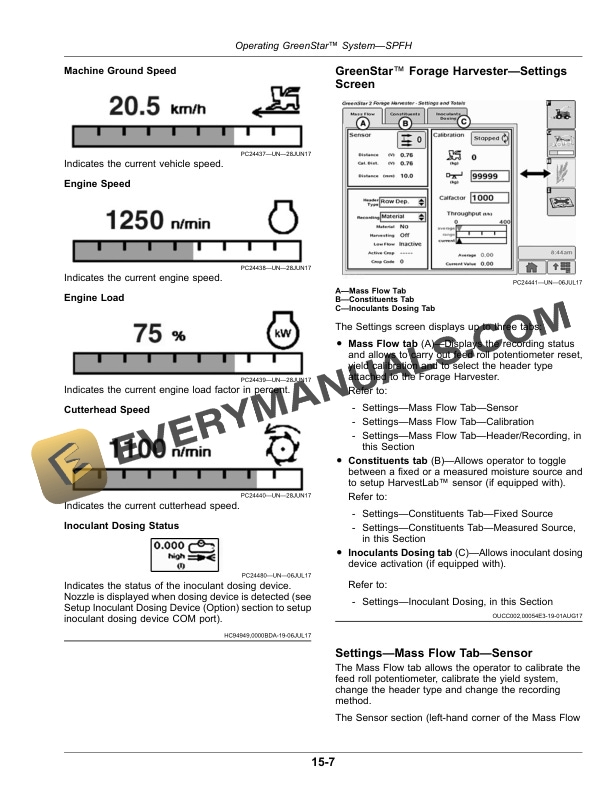
- 3.8.1. Machine Ground Speed
- 3.8.2. Engine Speed
- 3.8.3. Engine Load
- 3.8.4. Cutterhead Speed
- 3.8.5. Inoculant Dosing Status
- 3.9. GreenStar Forage HarvesterSettings Screen
- 3.10. SettingsMass Flow TabSensor
- 3.11. SettingsMass Flow TabCalibration
- 3.12. SettingsMass Flow TabHeader/Recording
- 3.13. SettingsConstituents TabFixed Source
- 3.14. SettingsConstituents TabMeasured Source
- 3.14.1. Calibration and MeasurementAutoGraph
- 3.14.2. Calibration and MeasurementAuto
- 3.14.3. Calibration and MeasurementManualGraph
- 3.14.4. Calibration and MeasurementManual
- 3.14.5. GreenStar Forage HarvesterManual Calibration Selection
- 3.15. SettingsInoculants Dosing Tab
- 3.16. GreenStar Forage HarvesterHarvestLab Settings
- 3.16.1. Wavelength Standard Measurement (HarvestLab SensorVersion 1.4 only)
- 3.17. GreenStar Forage HarvesterDiagnostic Readings Screen
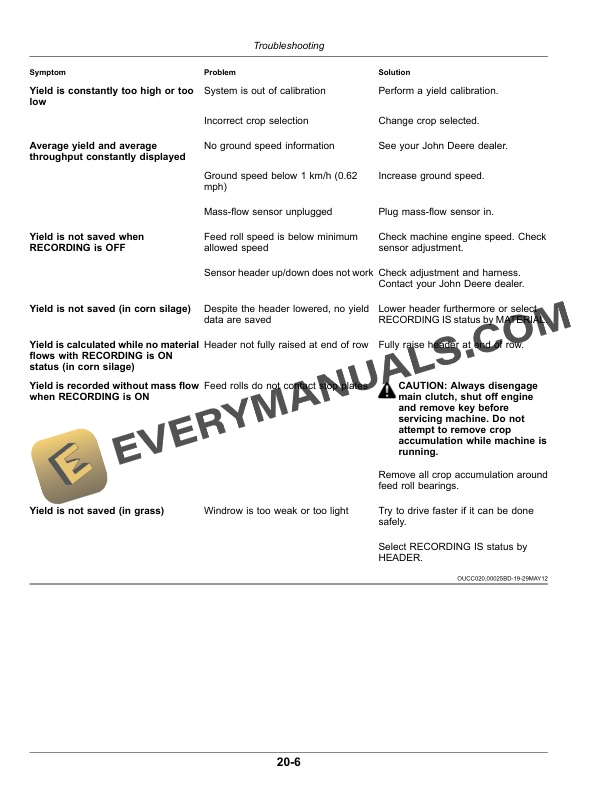
- 4. Troubleshooting
- 4.1. Warning ScreensDiagnostic Trouble Codes
- 4.1.1. Recall Codes / Recall All Codes
- 4.2. Control Unit (HMS) Diagnostic Trouble Code List
- 4.3. and 2630 Display Diagnostic Trouble Code List
- 4.4. Control Unit
- 4.5. HarvestLab Sensor
- 4.6. Feed Roll Potentiometer
- 5. Service
- 5.1. Adjust HarvestLab Sensor Working Position
- 5.2. Replace HarvestLab Sensor Adapter Glass
- 5.3. Adjust Feed Roll Speed Sensor
- 5.4. After the First 50 Operating Hours
- 5.5. Every 50 HoursCheck Feed Roll Stop Plates
- 5.6. Once a Year
- 5.7. As Required (HarvestLab Sensor Version 1.4 Only)
- 5.8. As RequiredChange Printer Paper Roll
- 5.9. As RequiredChange Printer Ink Ribbon
- 6. Specifications
- 6.1. Metric Bolt and Screw Torque Values
- 6.2. EC Declaration of ConformityHarvestLab Sensor Version 1.4
- 6.3. EC Declaration of ConformityHarvestLab 3000 Sensor
- 6.4. Safety Note Regarding the Subsequent Installation of Electrical and Electronic Appliances and/or Components
- 6.5. Identify Date Code
- 6.6. Eurasian Economic Union
- 6.7. Eurasian Economic UnionEAC (English and Russian) HarvestLab Version 1.4
- 6.8. Eurasian Economic UnionEAC (English and Russian) HarvestLab 3000
- 7. Serial Numbers
- 7.1. Identification Labels
- 7.2. Display Serial Number
- 7.3. Feed Roll Potentiometer Serial Number
- 7.4. HarvestLab Sensor (Version 1.4) Serial Number
- 7.5. HarvestLab 3000 Sensor Serial Number
- 7.6. Connection Box Serial Number
- 7.7. Control Unit Serial Number
- 7.8. Printer Serial Number (Option)
- 8. John Deere Service Keeps You On The Job
- 8.1. John Deere Parts
- 8.2. The Right Tools
- 8.3. WellTrained Technicians
- 8.4. Prompt Service