Description
-
Model List:
- 708FC Folding Corn Head
- 1. Contents
- 1.1. Identification View
- 1.1.1. Identification View
- 1.2. Corn Head Safety Features
- 1.2.1. Corn Head Safety Features
- 1.2.2. Recognize Safety Information
- 1.2.3. Understand Signal Words
- 1.2.4. Follow Safety Instructions
- 1.2.5. Spanish Safety Signs and Operators Manual
- 1.2.6. Ballasting for Safe Ground Contact
- 1.2.7. Parking and Leaving the Machine
- 1.2.8. Prepare for Emergencies
- 1.2.9. Wear Protective Clothing
- 1.2.10. Stay Clear of Harvesting Units
- 1.2.11. Use Safety Lights and Devices
- 1.2.12. Transport Combine With Header Safely
- 1.2.13. Road Transport Disconnect Switch
- 1.2.14. Practice Safe Maintenance
- 1.2.15. Remove Paint Before Welding or Heating
- 1.2.16. Avoid Heating Near Pressurized Fluid Lines
- 1.2.17. Avoid Entanglement
- 1.2.18. Avoid Contact With Moving Parts
- 1.2.19. Stay Clear of Rotating Drivelines
- 1.2.20. Guards and Shields
- 1.2.21. Avoid HighPressure Fluids
- 1.2.22. Service Accumulator Systems Safely
- 1.2.23. Service Machines Safely
- 1.2.24. Service Drive Belts Safely
- 1.2.25. Protect Against High Pressure Spray
- 1.2.26. Decommissioning Proper Recycling and Disposal of Fluids and Components
- 1.2.27. Support Machine Properly
- 1.2.28. Store Attachments Safely
- 1.3. Safety Decals
- 1.3.1. Front View Decals
- 1.3.2. Rear View Decals
- 1.3.3. Rear View Decals (Continued)
- 1.3.4. Side View Decals
- 1.3.5. Replace Safety Signs
- 1.4. Haulage
- 1.4.1. Preparing the Corn Head for Haulage
- 1.4.2. Securing Corn Head for Transport (Lashing Points)
- 1.5. Preparing the Corn Head
- 1.5.1. Unpacking
- 1.5.2. Removing the Transport Pallet
- 1.6. Transport
- 1.6.1. Lowering Outer Gatherer Extensions
- 1.6.2. Folding/Unfolding the Corn Head
- 1.6.3. Transporting on Trailer
- 1.6.4. Transporting on Combine
- 1.7. Attaching and Detaching
- 1.7.1. Attaching Corn Head to Feeder House
- 1.7.2. Detaching Corn Head from Feeder House
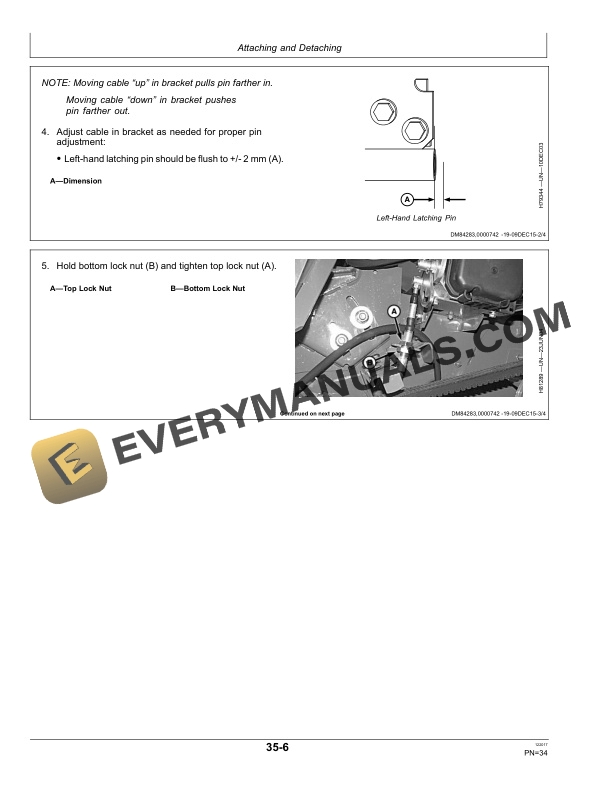
- 1.7.3. Single Point LatchingAdjusting
- 1.7.4. Level Land Feeder House Lower End CableAdjusting
- 1.7.5. Feeder House Latching Pins (Cleanout)
- 1.7.6. Feeder House Manual Unlatching
- 1.7.7. Latching Cable Shear Screw Location
- 1.8. Calibration and Settings
- 1.8.1. When to Calibrate
- 1.8.2. Calibration Error Codes
- 1.8.3. User Calibration Procedures for S Series Combines
- 1.8.4. Adjusting Feeder House Drop Rate and Sensitivity
- 1.9. Operating Corn Head
- 1.9.1. General Information
- 1.9.2. Starting in the Field
- 1.9.3. Adjust Corn Head Properly
- 1.9.4. Drive and Operate Carefully
- 1.9.5. StalkMaster Chopper (Option)
- 1.9.6. Armrest Functions
- 1.9.7. Active Header Control DisplayFeatures
- 1.9.8. Description of Automatic Header Height Control Systems
- 1.9.9. Header Engage/Disengage Drive
- 1.9.10. Corn Head Drive Speeds
- 1.9.11. Combines With FixedSpeed Feeder House
- 1.9.12. Harvesting Corn With Weakened or Broken Stalks
- 1.9.13. Harvesting Popcorn
- 1.9.14. Gatherers
- 1.9.15. Raising and Removing Inner Gatherer Points and Shields
- 1.9.16. Raising and Tilting Outer Gatherer Points and Shields
- 1.9.17. Ear Savers
- 1.9.18. Row Units
- 1.9.19. Hydraulic Adjustable Deck Plates
- 1.9.20. Outer Gatherer Extensions
- 1.9.21. Engaging and Disengaging StalkMaster Chopping Knives
- 1.10. Attachments and Options
- 1.10.1. Stalk Rolls
- 1.10.2. StalkMaster Chopping Gear Cases (Optional)
- 1.10.3. AutoTrac RowSense
- 1.11. Adjustments
- 1.11.1. Adjusting and Leveling Gatherer Points
- 1.11.2. Adjusting Trash Knives
- 1.11.3. Adjusting Gatherer Chain Tension
- 1.11.4. Adjusting Gatherer Chain Flights
- 1.11.5. Adjusting Deck Plates
- 1.11.6. Adjusting Row Unit Drive Chain
- 1.11.7. Adjusting Row Unit Drive Sprockets With Fixed Speed Drive ONLY
- 1.11.8. Adjusting Auger Height
- 1.11.9. Coupling the Chain
- 1.11.10. Adjusting Auger Drive Chain
- 1.12. Lubrication
- 1.12.1. Lubricant Storage
- 1.12.2. Alternative and Synthetic Lubricants
- 1.12.3. Mixing of Lubricants
- 1.13. Lubrication and Maintenance
- 1.13.1. Lubrication Symbols
- 1.13.2. Every 50 Hours of Operation
- 1.13.3. Every 200 Hours of Operation
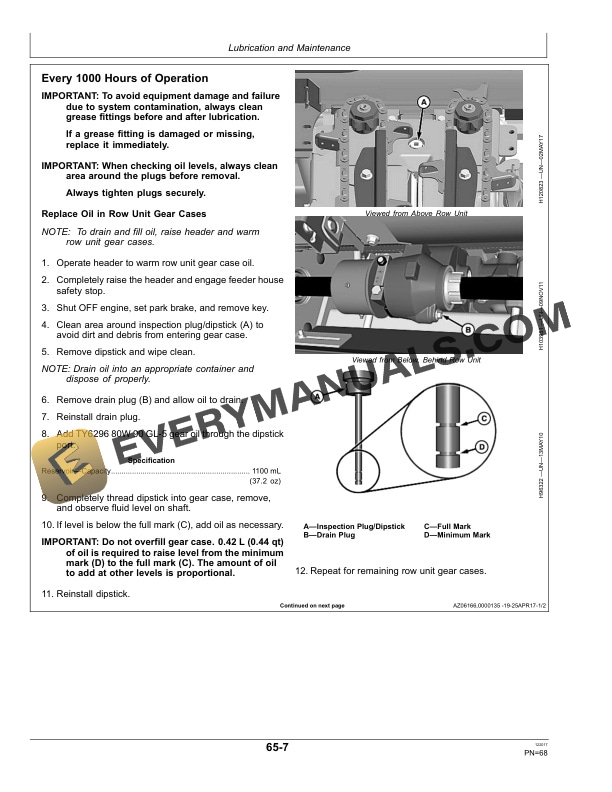
- 1.13.4. Every 1000 Hours of Operation
- 1.14. Troubleshooting
- 1.14.1. Corn Head
- 1.14.2. Active Header Control (AHC)
- 1.15. Service
- 1.15.1. Feeder House Safety Stop
- 1.15.2. Remove and Install Stalk Rolls
- 1.15.3. Reversing Gatherer Chains and Sprockets for Additional Wear
- 1.15.4. Remove and Install Gatherer Chain
- 1.15.5. Remove and Install Oil Pan
- 1.15.6. Remove and Install Wear Strips
- 1.15.7. Remove and Install StalkMaster Chopping Knife Blades
- 1.15.8. Header Warning Light Bulb Replacement
- 1.15.9. Cleaning Corn Head
- 1.16. Storage
- 1.16.1. End of Season Service
- 1.16.2. Beginning of Season Service
- 1.17. Specifications
- 1.17.1. Specifications
- 1.17.2. Keep Proof of Ownership
- 1.17.3. Keep Machines Secure
- 1.17.4. Unified Inch Bolt and Screw Torque Values
- 1.17.5. Metric Bolt and Screw Torque Values
- 1.18. Serial Number
- 1.18.1. Corn Head Type Plate
- 1.18.2. Serial Number
- 1.19. John Deere Service Keeps You On The Job
- 1.19.1. John Deere Parts
- 1.19.2. The Right Tools
- 1.19.3. WellTrained Technicians
- 1.19.4. Prompt Service
- 2. Page Number
- 2.1. Section 00
- 2.2. Section 05
- 2.3. Section 10
- 2.4. Section 15
- 2.5. Section 20
- 2.6. Section 25
- 2.7. Section 30
- 2.8. Section 35
- 2.9. Section 40
- 2.10. Section 45
- 2.11. Section 50
- 2.12. Section 55
- 2.13. Section 60
- 2.14. Section 65
- 2.15. Section 70
- 2.16. Section 75
- 2.17. Section 80
- 2.18. Section 85
- 2.19. Section 90