Description
-
Model List:
- GreenStar 2 System- Forage Harvesters
- 1. Contents
- 1.0.1. Recognize Safety Information
- 1.0.2. Understand Signal Words
- 1.0.3. Follow Safety Instructions
- 1.0.4. Mount and Dismount Safely With the Moisture Sensor
- 1.0.5. Maintain Stability
- 1.0.6. Keep Riders Off the Machine
- 1.0.7. Prepare for Emergencies
- 1.0.8. Practice Safe Maintenance
- 1.0.9. Avoid Heating Near Pressurized Fluid Lines
- 1.0.10. Keep Hands Away From Knives
- 1.0.11. Stay Clear of Harvesting Units
- 1.0.12. Avoid Contact With Moving Parts
- 1.0.13. Avoid HighPressure Fluids
- 1.0.14. Remove Paint Before Welding or Heating
- 1.0.15. Dispose of Waste Properly
- 1.1. Component Location
- 1.1.1. Display
- 1.1.2. MassFlow Sensor
- 1.1.3. Moisture Sensor
- 1.1.4. Feed Roll Speed Sensor
- 1.1.5. Control Unit
- 1.1.6. Integrated Printer (Option)
- 1.2. Operating GreenStar 2 SystemSPFH
- 1.2.1. Read me First
- 1.2.2. GreenStar 2 Forage HarvesterMain Screen
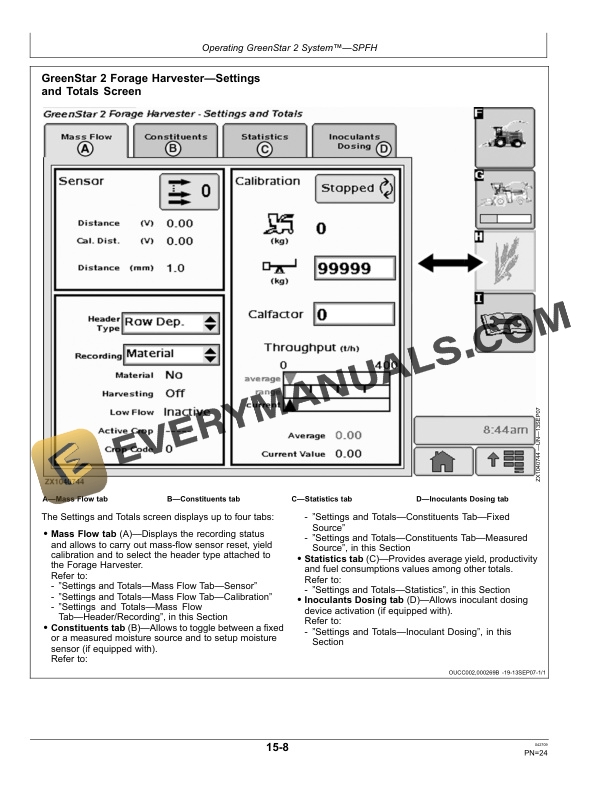
- 1.2.3. GreenStar 2 Forage HarvesterSettings and Totals Screen
- 1.2.4. Settings and TotalsMass Flow TabSensor
- 1.2.5. Settings and TotalsMass Flow TabCalibration
- 1.2.6. Settings and TotalsMass Flow TabHeader/Recording
- 1.2.7. Settings and TotalsConstituents TabFixed Source
- 1.2.8. Settings and TotalsConstituents TabMeasured Source
- 1.2.9. Settings and TotalsStatistics Tab
- 1.2.10. Settings and TotalsInoculants Dosing Tab
- 1.2.11. GreenStar 2 Forage HarvesterHarvestLab Settings
- 1.2.12. GreenStar 2 Forage HarvesterDiagnostic Readings Screen
- 1.3. Troubleshooting
- 1.3.1. Warning ScreensDiagnostic Trouble Codes
- 1.3.2. Control Unit (HMS) Diagnostic Trouble Code List
- 1.3.3. Display Diagnostic Trouble Code List
- 1.3.4. Control Unit
- 1.3.5. Moisture Sensor
- 1.3.6. MassFlow Sensor
- 1.4. Service and Maintenance
- 1.4.1. After the First 50 Operating Hours
- 1.4.2. As Required
- 1.4.3. At Least Once a Year
- 1.4.4. Adjusting Moisture Sensor Working Position
- 1.4.5. Replacing Moisture Sensor Bulb
- 1.4.6. Replacing Moisture Sensor Adapter Glass
- 1.4.7. Adjusting Feed Roll Speed Sensor
- 1.4.8. Checking Feed Roll Stop PlatesEvery 50 Hours
- 1.4.9. Changing Printer Paper RollAs Required
- 1.4.10. Changing Printer Ink RibbonAs Required
- 1.5. Specifications
- 1.5.1. Metric Bolt and Screw Torque Values
- 1.5.2. Declaration of Conformity
- 1.5.3. Safety Note Regarding the Subsequent Installation of Electrical
- 1.6. Serial Numbers
- 1.6.1. Identification Labels
- 1.6.2. Display Serial Number
- 1.6.3. MassFlow Sensor Serial Number
- 1.6.4. Moisture Sensor Serial Number
- 1.6.5. Connection Box Serial Number
- 1.6.6. Control Unit Serial Number
- 1.6.7. Printer Serial Number (Option)
- 1.7. John Deere Service Keeps You On The Job
- 1.7.1. John Deere Parts
- 1.7.2. The Right Tools
- 1.7.3. WellTrained Technicians
- 1.7.4. Prompt Service
- 2. Page Number
- 2.1. Section 05
- 2.2. Section 10
- 2.3. Section 15
- 2.4. Section 20
- 2.5. Section 25
- 2.6. Section 30
- 2.7. Section 35