Description
-
Model List:
- Individual Nozzle Control HD-Pro
- 1. Introduction
- 1.1. Trademarks
- 1.2. Foreword
- 1.3. Emissions Performance and Tampering
- 1.3.1. Operation and Maintenance
- 1.3.2. Tampering
- 1.4. Recognize Safety Information
- 1.5. Understand Signal Words
- 1.6. Follow Safety Instructions
- 1.7. Spanish Safety Signs and Operators Manual
- 1.8. Prepare for Emergencies
- 1.9. Wear Protective Clothing
- 1.10. Protect Against Noise
- 1.11. Practice Safe Maintenance
- 1.12. Handle Electronic Components and Brackets Safely
- 1.13. Park Machine Safely
- 1.14. Remove Paint Before Welding or Heating
- 1.15. Avoid Heating Near Pressurized Fluid Lines
- 1.16. Avoid HighPressure Fluids
- 1.17. Follow Tire Recommendations
- 1.18. Service Tires Safely
- 1.19. Decommissioning Proper Recycling and Disposal of Fluids and Components
- 1.20. Handle Chemical Products Safely
- 1.21. Service Spray Equipment Safely
- 1.22. Service Spray System Safely
- 1.23. Use Proper Tools
- 1.24. Work In Ventilated Area
- 1.25. Handling Batteries Safely
- 1.26. Service Drive Belts Safely
- 1.27. Do Not Open HighPressure Fuel System
- 1.28. Service Cooling System Safely
- 1.29. Service Accumulator Systems Safely
- 1.30. Clean Exhaust Filter Safely
- 1.31. Exhaust Filter Ash Handling and Disposal
- 1.32. Using Compressed Air For Cleaning
- 1.33. Working Area
- 1.34. Operate Safely
- 1.35. Use Safety Lights and Devices
- 1.36. Keep Riders Off Machine
- 1.37. Instructional Seat
- 1.38. Use Steps and Handholds Correctly
- 1.39. Use Seat Belt Properly
- 1.40. Use Caution On Hillsides
- 1.41. Transport and Operate Safely
- 1.42. Transporting Machine Using Trailer
- 1.43. Prevent Machine Runaway
- 1.44. Handle Fuel SafelyAvoid Fires
- 1.45. Avoid Static Electricity Risk When Refueling
- 1.46. Handle Agricultural Chemicals Safely
- 1.47. Avoid Exposure To Chemicals
- 1.48. Clean Vehicle of Hazardous Chemicals, Including Pesticides
- 1.49. NonPermissible Use
- 1.50. Emergency Exit
- 1.50.1. R4030, R4038, R4044, R4045, and R4060
- 1.50.2. , 410R, 412R, 612R, and 616R
- 2. Safety Signs
- 2.1. Replace Safety Signs
- 2.2. Safety Signs
- 3. Safety Features
- 3.1. Safety Features
- 4. Controls
- 4.1. Key Switch
- 4.2. Operate Lights
- 4.3. Corner Post Display
- 4.4. MultiFunction Lever
- 4.5. Spraying Controls
- 4.6. Spraying Controls
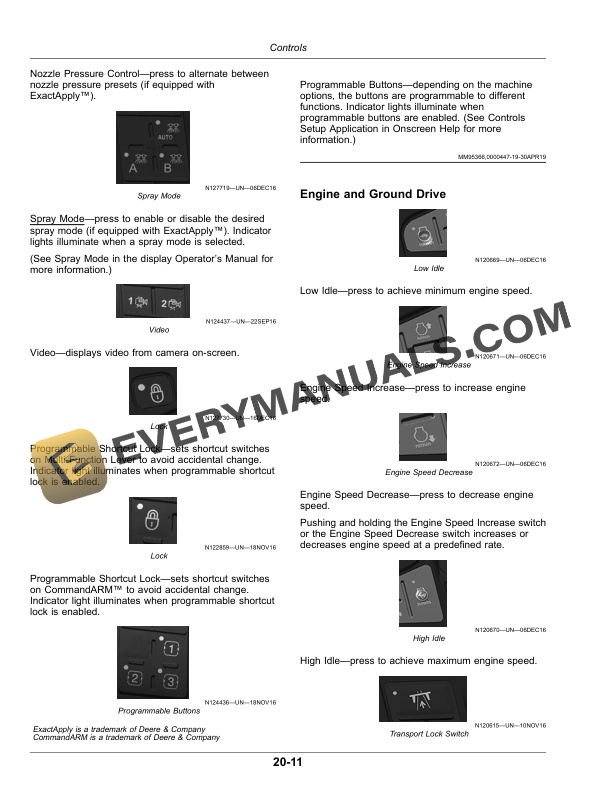
- 4.7. Engine and Ground Drive
- 5. Individual Nozzle Control (INC) Pro System
- 5.1. Individual Nozzle Control (INC) Pro System Overview
- 5.2. Individual Nozzle Control (INC) Pro Mode Comparison
- 5.3. Customize Spray Sections
- 5.4. Conversion Factors (Calibrating for Carriers Other Than Water)
- 6. Boom And Nozzles Application
- 6.1. Access Boom and Nozzles
- 6.2. Boom and Nozzles Main Page
- 6.3. Boom Sections Custom
- 6.4. Nozzle Setup
- 6.5. Set to Current
- 6.6. Return to Height Mode
- 6.7. Working Width
- 6.8. INC Pro Configuration
- 6.9. Nozzle Controller Status
- 6.10. Determining Nozzle Location
- 6.11. INC Pro Status
- 6.12. Advanced Settings
- 6.13. Section Setup
- 6.14. Limit Minimum Flow Percentage
- 6.15. Installed Spray Tips
- 6.16. Manage Description(s)
- 6.17. Select Tip
- 6.18. Edit Tip
- 6.19. Fence Row
- 6.20. Turn Compensation
- 6.21. Target Spray Pressure
- 6.22. Section Control Status
- 6.23. Valve Pulsing Mode
- 7. Operating Individual Nozzle Control Pro
- 7.1. Service and Operate Chemical Sprayers Safely
- 7.2. Avoid Exposure To Chemicals
- 7.3. Machine Informational Decals
- 7.3.1. Component Wash Decal
- 7.4. Individual Nozzle Control (INC) Pro Strainer Requirements
- 7.5. Spray Tip Selection
- 7.6. Standard Flow System CharacteristicsFlow Rate vs. Pressure
- 7.7. High Flow System CharacteristicsFlow Rate vs. Pressure
- 7.8. High Flow System Characteristics with NitrogenFlow Rate vs. Pressure
- 7.9. Operate System with Direct Injection Installed
- 7.10. Filling the Sprayer with Water
- 7.10.1. Quality of Water
- 7.11. Before Field Operation
- 7.12. Field Operation
- 7.13. Operate Indexed Boom Sections (IBS)
- 7.14. Operate Boom Isolation Valve
- 7.15. Operate System with the Remote Control
- 7.15.1. Remote Control Range
- 7.15.2. Remote Control Diagnostics
- 7.15.3. Remote Control Operation
- 7.16. Pressure Relief
- 8. Maintenance
- 8.1. Service and Operate Chemical Sprayers Safely
- 8.2. Avoid Exposure To Chemicals
- 8.3. Service Spray System Safely
- 8.4. Clean Vehicle of Hazardous Chemicals, Including Pesticides
- 8.5. Recommended Cleaners And Coatings
- 8.6. Clean Solution System
- 8.7. Clean Nozzle Body
- 8.8. Rinse Nozzle BodiesDaily
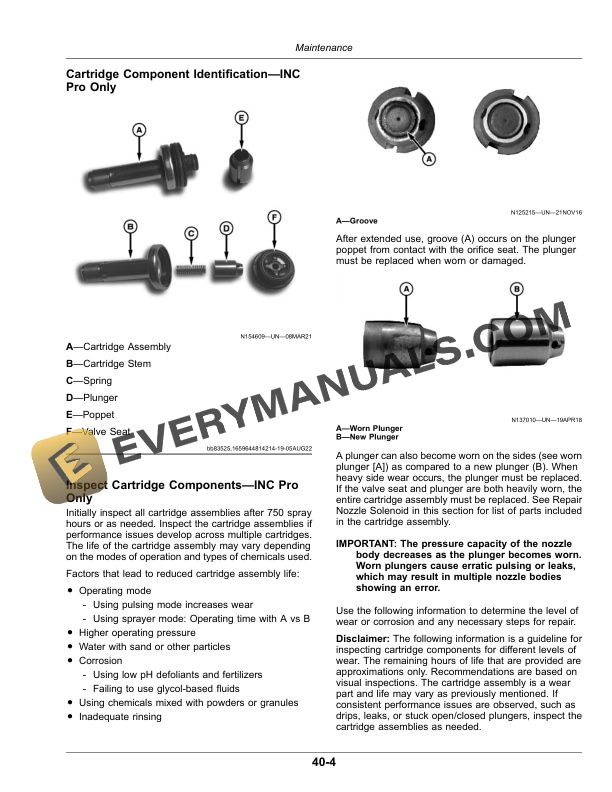
- 8.9. Cartridge Component IdentificationINC Pro Only
- 8.10. Inspect Cartridge ComponentsINC Pro Only
- 8.10.1. No Wear
- 8.10.2. Light Wear
- 8.10.3. Moderate Wear
- 8.10.4. Heavy Wear
- 8.10.5. Excessive Wear
- 8.10.6. Light Corrosion and Pitting
- 8.10.7. Moderate Corrosion and Pitting
- 8.10.8. Heavy Corrosion and Pitting
- 8.10.9. Broken Spring
- 8.11. Remove and Install Nozzle BodyAs Required (INC Pro Only)
- 8.12. Remove and Install Nozzle BodyAs Required (INC HD Only)
- 8.13. Repair Nozzle Turret
- 8.14. Repair Nozzle SolenoidINC Pro Only
- 8.15. Repair Nozzle Half Clamp
- 8.16. Remove and Install Valve AssemblyAs Required (INC HD Only)
- 8.17. Remove and Install Actuator AssemblyAs Required (INC HD Only)
- 8.18. Fuse Locations
- 8.18.1. Main Power Fuse
- 8.18.2. Individual Nozzle Control (INC) Fuse LocationsR4030, R4038, R4044, R4045, and R4060
- 8.18.3. Individual Nozzle Control (INC) Fuse Locations408R, 410R, 412R, 612R, and 616R
- 8.19. Remote Service ADVISOR Connection Location
- 8.20. Remote Control Pairing Procedure
- 9. Troubleshooting
- 9.1. Diagnostic Pages
- 9.2. Locating Faulted Nozzles
- 9.3. Nozzle Body
- 9.4. Remote Nozzle Control
- 10. Storage
- 10.1. Service and Operate Chemical Sprayers Safely
- 10.2. Avoid Exposure To Chemicals
- 10.3. Clean Vehicle of Hazardous Chemicals, Including Pesticides
- 10.4. Recommended Cleaners and Coatings
- 10.5. Clean Solution System
- 10.6. Ship Machine During ColdWeather Months
- 10.7. Prepare Machine for ColdWeather Storage Winterizing
- 10.8. Prepare Machine for Storage
- 10.9. Prepare Foam Marker System for ColdWeather Storage
- 10.10. Prepare Foam Marker System for ColdWeather Storage
- 10.11. Remove Machine from Storage
- 11. Specifications
- 11.1. Machine Specification
- 11.2. Bluetooth Compliance Information
- 11.3. Identification Numbers
- 11.4. Keep Proof of Ownership
- 11.5. Keep Machines Secure
- 12. John Deere Service Literature Available
- 12.1. Technical Information
- 13. John Deere Service Keeps You On The Job
- 13.1. John Deere Is At Your Service