Description
-
Model List:
- TruSet
- 1. Contents
- 1.0.1. Recognize Safety Information
- 1.0.2. Understand Signal Words
- 1.0.3. Follow Safety Instructions
- 1.0.4. Replace Safety Signs
- 1.0.5. Prepare for Emergencies
- 1.0.6. Wear Protective Clothing
- 1.0.7. Protect Against Noise
- 1.0.8. Practice Safe Maintenance
- 1.0.9. Park Machine Safely
- 1.0.10. Use Safe Service Procedures
- 1.0.11. Work in Clean Area
- 1.0.12. Service Machines Safely
- 1.0.13. Support Machine Properly
- 1.0.14. Avoid HighPressure Fluids
- 1.0.15. Use Proper Tools
- 1.0.16. Tighten Hardware
- 1.1. How to Use Monitor
- 1.1.1. Use with GreenStar Monitors
- 1.1.2. Monitor Controls
- 1.1.3. Monitor Power Up and Power Down
- 1.1.4. Standard Buttons
- 1.1.5. Input Entry Methods
- 1.1.6. Screen Layout Manager
- 1.1.7. Screen Navigation
- 1.2. Monitor Settings
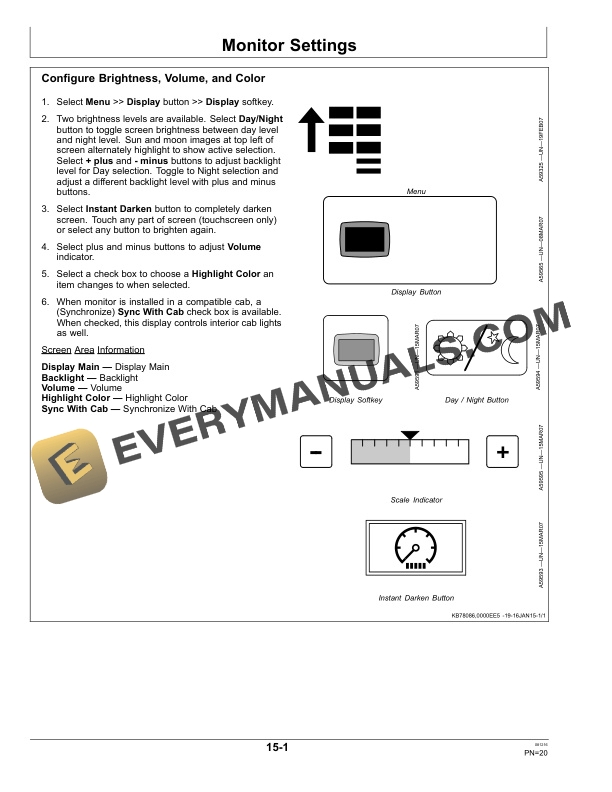
- 1.2.1. Configure Brightness, Volume, and Color
- 1.2.2. Configure Language and Units of Measure
- 1.2.3. Configure Date and Time
- 1.2.4. Touchscreen Calibration
- 1.3. Performance Monitor
- 1.3.1. Check Implement Width
- 1.4. Attaching and Detaching
- 1.4.1. Attach External SCV Lever Wiring Harness
- 1.4.2. Attach GreenStar Wiring HarnessTruSet Machines
- 1.4.3. Make Proper Hose ConnectionsExternal Valve
- 1.5. Preparing TruSet
- 1.5.1. Before Preparing TruSet
- 1.5.2. Disengage SinglePoint Depth Control
- 1.5.3. Access Setup Screen
- 1.5.4. Assign SCV Functions
- 1.5.5. Adjust Incremental Step Size
- 1.5.6. Level Closing Disk Sections
- 1.5.7. Perform Static Calibration
- 1.5.8. Adjust Machine Upper Setpoint
- 1.5.9. Choose Layout Manager
- 1.6. Operating TruSet
- 1.6.1. Understand SCV Functions
- 1.6.2. Verify Machine Status
- 1.6.3. Perform Field Calibration
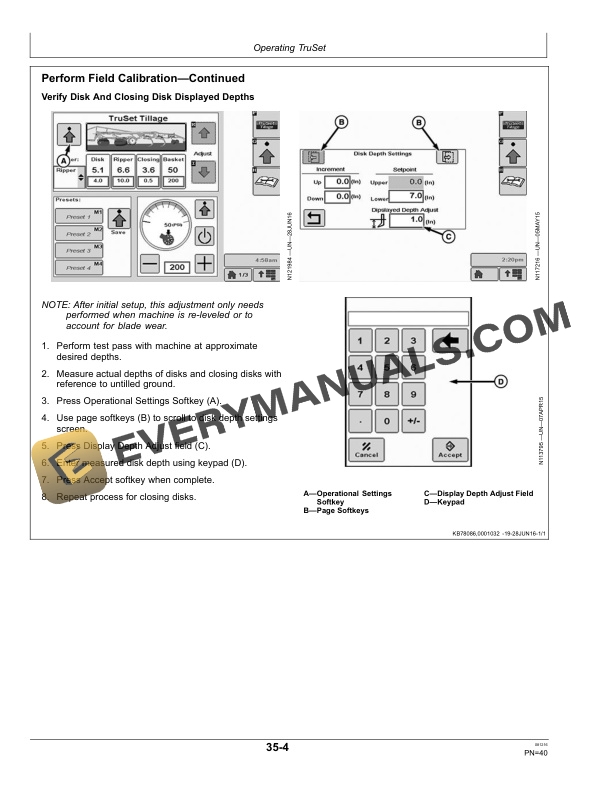
- 1.6.4. Perform Field CalibrationContinued
- 1.6.5. Make Initial Setpoints
- 1.6.6. Store and Use Preset Values
- 1.6.7. Engage TruSet
- 1.6.8. Bypass TruSet
- 1.7. Troubleshooting TruSet
- 1.7.1. Troubleshooting ChartTruSet
- 1.8. Servicing TruSet
- 1.8.1. Components
- 1.8.2. TruSet Component Locations
- 1.8.3. AddOn Valve Components
- 1.9. Product Identification
- 1.9.1. Keep Proof of Ownership
- 1.9.2. Keep Machines Secure
- 1.10. John Deere Service Literature Available
- 1.10.1. Technical Information
- 1.11. John Deere Service Keeps You On The Job
- 1.11.1. John Deere Is At Your Service
- 2. Page Number
- 2.1. Section 05
- 2.2. Section 10
- 2.3. Section 15
- 2.4. Section 20
- 2.5. Section 25
- 2.6. Section 30
- 2.7. Section 35
- 2.8. Section 40
- 2.9. Section 45
- 2.10. Section 50