John Deere Connect Mobile Operator Manual OMPFP20005
$30
- Type Of Manual: Operator Manual
- Manual ID: OMPFP20005
- Format: PDF
- Size: 1.0MB
- Number of Pages: 32
Description
-
Model List:
- Connect Mobile
- 1. Introduction
- 1.1. Foreword
- 1.2. John Deere Technical Information Bookstore
- 1.3. Recognize Safety Information
- 1.4. Understand Signal Words
- 1.5. Follow Safety Instructions
- 1.6. Practice Safe Maintenance
- 1.7. Use Steps and Handholds Correctly
- 1.8. Handle Electronic Components and Brackets Safely
- 1.9. Use Electronic Display Properly
- 1.10. Prevent Electrical Shock and Fires
- 1.11. Avoid Exposure to High Radio Frequency Fields
- 1.12. Remote Controls
- 2. System Overview
- 2.1. Theory of Operation
- 2.2. Requirements
- 2.3. John Deere Operations Center
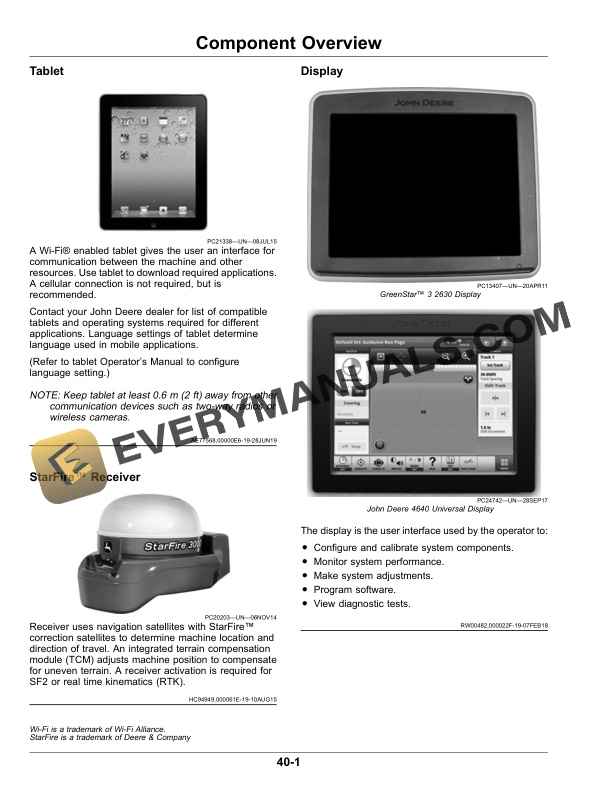
- 3. Component Overview
- 3.1. StarFire Receiver
- 3.2. Display
- 3.3. Wireless Data Server
- 3.4. Wireless Data Server Coaxial Cable and Antenna
- 3.5. Seed Control UnitPlanter Only
- 3.6. Junction BoxPlanter Only
- 4. Setting UpConnect Mobile
- 4.1. Download Connect Mobile
- 5. Setting UpGreenStar 3 2630 Display
- 5.1. Set Up Connect Mobile
- 5.2. Configure Wireless Data Server
- 5.3. Connect Tablet to Wireless Data Server
- 5.4. Set Up Display
- 6. Setting UpGeneration 4 Display
- 6.1. Set Up Connect Mobile
- 6.2. Configure Wireless Data Server (Planter)
- 6.3. Configure Connect Mobile Server (Sprayer or Combine)
- 6.4. Connect Tablet to Wireless Network
- 6.5. Set Up Display
- 7. Operating
- 7.1. Operate Connect Mobile
- 7.2. Use Connect Mobile
- 7.3. Interactive Combine AdjustmentCombine Only
- 7.4. Navigate to Wireless Data Server Page
- 7.4.1. Using GreenStar 3 2630 Display
- 7.4.2. Using Generation 4 Display
- 7.5. View Wireless Data Server Main Page
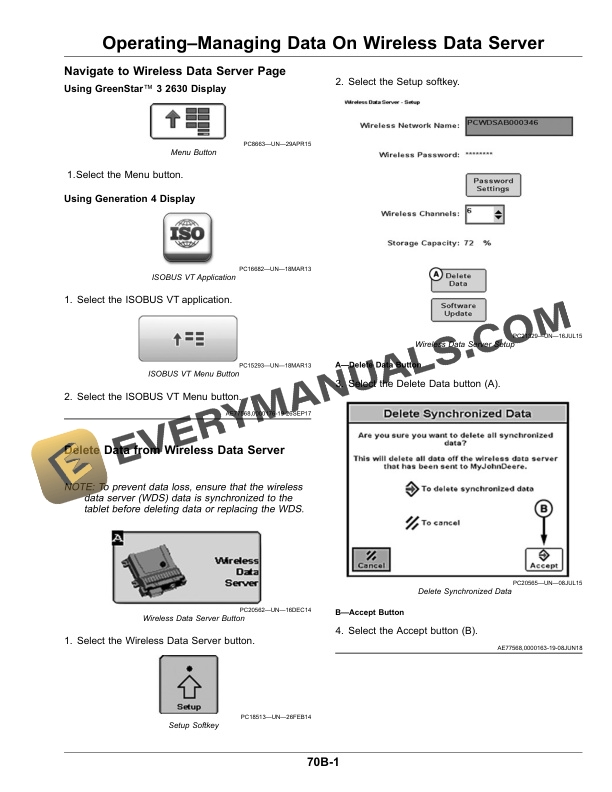
- 8. OperatingManaging Data On Wireless Data Server
- 8.1. Navigate to Wireless Data Server Page
- 8.1.1. Using GreenStar 3 2630 Display
- 8.1.2. Using Generation 4 Display
- 8.2. Delete Data from Wireless Data Server
- 9. OperatingUpdating Software
- 9.1. Update Software
- 9.2. Update Wireless Data Server
- 9.3. Update Connect Mobile Server Application
- 9.4. Update Connect Mobile Application
- 10. OperatingResetting WDS Password
- 10.1. Navigate to Wireless Data Server Page
- 10.1.1. Using GreenStar 3 2630 Display
- 10.1.2. Using Generation 4 Display
- 10.2. Reset Wireless Password
- 11. Troubleshooting
- 11.1. Navigate to Wireless Data Server Page
- 11.1.1. Using GreenStar 3 2630 Display
- 11.1.2. Using Generation 4 Display
- 11.2. Wireless Data Server Diagnostics
- 11.3. Connect Mobile Server Diagnostics
- 11.4. Additional Support Material
- 11.5. TroubleshootingTablet
- 12. Maintenance
- 12.1. Preseason Checklist
- 12.2. Postseason Checklist
- 12.3. Daily Checklist
- 13. John Deere Service Literature Available
- 13.1. Technical Information
- 14. John Deere Service Keeps You On Job
- 14.1. John Deere Is At Your Service
Related products


-50%

Original price was: $20.$10Current price is: $10.
-50%

Original price was: $20.$10Current price is: $10.

-50%

Original price was: $20.$10Current price is: $10.
-50%

Original price was: $20.$10Current price is: $10.
-50%

Original price was: $20.$10Current price is: $10.