Description
-
Model List:
- Active Implement Guidance
- 1. Introduction
- 1.1. Foreword
- 1.2. John Deere Technical Information Bookstore
- 1.3. Recognize Safety Information
- 1.4. Understand Signal Words
- 1.5. Follow Safety Instructions
- 1.6. Practice Safe Maintenance
- 1.7. Use Steps and Handholds Correctly
- 1.8. Handle Electronic Components and Brackets Safely
- 1.9. Use Electronic Display Properly
- 1.10. Operate Implement Automation Systems Safely
- 1.11. Avoid HighPressure Fluids
- 2. Regulatory and Compliance Information
- 2.1. Identify Date Code
- 2.2. Eurasian Economic Union EAC
- 2.3. EU Declaration of Conformity
- 3. System Overview
- 3.1. Theory of Operation
- 3.2. Active Implement Guidance Requirements
- 3.2.1. Hardware
- 3.2.2. Software
- 3.3. Navigate to Application Controller Using Generation 4 Display
- 3.4. Activate Active Implement Guidance
- 3.5. Machine Compatibility
- 3.6. Replace Erasable Programmable Read Only Memory (EPROM)
- 3.7. Using Active Implement Guidance with iGrade
- 4. Softkey Legend
- 4.1. Application Controller 1100Setup Softkey
- 4.2. Application Controller 1100Main Softkey
- 4.3. GreenStarGuidance Softkey
- 4.4. StarFire ReceiverStarFire Softkey
- 4.5. StarFire ReceiverRTK Softkey
- 4.6. StarFire ReceiverSatellite Softkey
- 4.7. StarFire ReceiverDiagnostics Softkey
- 5. Component Overview
- 5.1. Monitor and Control System
- 5.2. StarFire Receiver
- 5.2.1. StarFire Receiver Shared Signal
- 5.3. Display
- 5.4. Wheel Angle Sensor
- 5.4.1. Install Requirements
- 5.5. Application Controller
- 5.6. Counterbalance Valve
- 5.7. External Valve
- 5.8. Active Implement Guidance Height Switch
- 6. Setting Up
- 6.1. Machine and Implement Setup
- 6.2. Connect Implement
- 6.3. Configure Implement StarFire Receiver
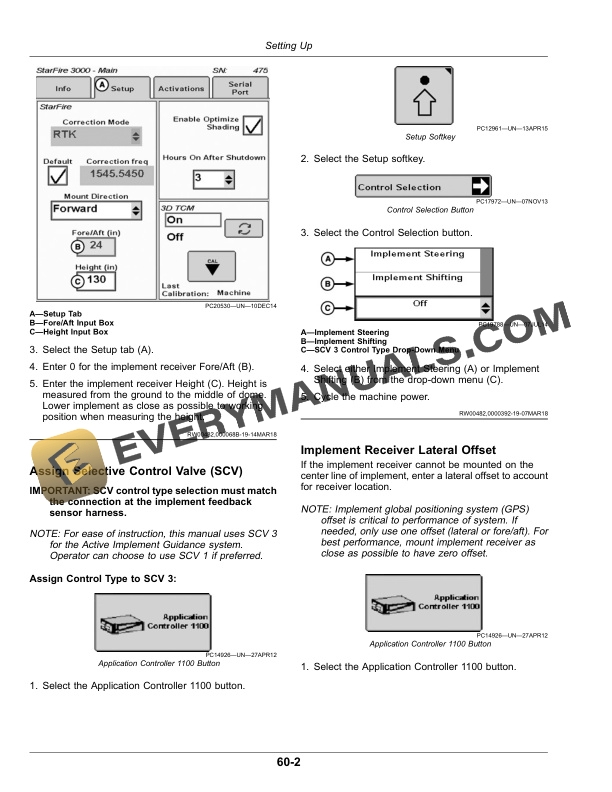
- 6.4. Assign Selective Control Valve (SCV)
- 6.5. Implement Receiver Lateral Offset
- 6.6. Implement Receiver Fore/Aft Offset
- 6.7. Optimize Terrain Compensation Module (TCM)
- 6.8. Calibrate Terrain Compensation Module (TCM)
- 6.9. Verify Hydraulic Flow Routing and Wheel Angle Sensor Position (Implement Steering Only)
- 6.10. Calibrate Implement Steering (Implement Steering Only)
- 6.11. Adjust Selective Control Valve (SCV)
- 6.11.1. GreenStar 3 CommandCenter
- 6.11.2. TouchSet Display
- 6.12. Set Up Hydraulic ControlSelective Control Valve (SCV)
- 6.13. Set Up Hydraulic ControlExternal Valve
- 6.14. Adjust Dual Counterbalance Valve
- 7. Operating Active Implement Guidance
- 7.1. Basic Operation of Active Implement Guidance System
- 7.2. Active Implement Guidance Operation
- 7.3. Select Mode for Engagement
- 7.4. Select Optional Guidance Features
- 7.4.1. Follow Mode (Implement Steering Only)
- 7.4.2. Shifter Stay On Mode (Implement Shifting Only)
- 7.4.3. Global Line Shifts (Implement Steering Only)
- 7.5. Engage Active Implement Guidance
- 7.6. Adjust Sensitivity Settings
- 7.7. Disable Active Implement Guidance
- 8. Optimize Active Implement Guidance
- 8.1. Optimize Machine AutoTrac Performance
- 8.2. Optimize Active Implement Guidance
- 9. Disconnecting Active Implement Guidance
- 9.1. Disconnecting the Active Implement Guidance System
- 10. Thirdparty Installation
- 10.1. Low Side Driver
- 11. Troubleshooting
- 11.1. Satellite Information
- 11.2. Reset Application Controller 1100
- 11.3. Reset Application Controller 1100 Settings
- 11.4. System Status
- 11.5. Input/Output (I/O) Voltages
- 11.6. Machine Configuration
- 11.7. External Valve
- 11.8. Implement Performance
- 11.9. Receiver
- 11.10. Data Cleanup
- 11.11. Clean Up ISOBUS VT
- 12. Maintenance
- 12.1. Machine
- 12.2. Preseason Checklist
- 12.3. Daily Checklist
- 12.4. Postseason Checklist
- 13. John Deere Service Literature Available
- 13.1. Technical Information
- 14. John Deere Service Keeps You on The Job
- 14.1. John Deere Is At Your Service