John Deere AutoTrac Controller-Raven Operator Manual OMPFP17742
$30
- Type Of Manual: Operator Manual
- Manual ID: OMPFP17742
- Format: PDF
- Size: 2.9MB
- Number of Pages: 72
Description
-
Model List:
- AutoTrac Controller-Raven
- 1. Introduction
- 1.1. Foreword
- 1.2. John Deere Technical Information Bookstore
- 1.3. Recognize Safety Information
- 1.4. Understand Signal Words
- 1.5. Follow Safety Instructions
- 1.6. Practice Safe Maintenance
- 1.7. Use Steps and Handholds Correctly
- 1.8. Handle Electronic Components and Brackets Safely
- 1.9. Use Seat Belt Properly
- 1.10. Operate Guidance Systems Safely
- 1.11. Use Electronic Display Properly
- 1.12. Use AutoTrac Controller on Approved Machines
- 1.13. Inspect AccuGuide PressureTransducer Valve for Leaks
- 2. Safety Signs
- 2.1. Automatic Guidance System Detected
- 2.2. Wheel Movement
- 2.3. Wheel Movement
- 2.4. Machine Movement
- 3. Regulatory and Compliance Information
- 3.1. Federal Communications Commission Notifications to User
- 3.2. EC Declaration of Conformity (No. EN F0007)
- 3.3. Identify Date Code
- 3.4. Eurasian Economic UnionEAC
- 4. System Overview
- 4.1. Theory of Operation
- 4.2. AutoTrac Raven Requirements
- 4.3. Activate AutoTrac
- 4.4. AutoTrac Accuracy
- 5. Softkey Legend
- 5.1. StarFire ReceiverStarFire Softkey
- 5.2. GreenStarGuidance Softkey
- 5.3. AutoTrac ControllerTool Box Softkey
- 5.4. AutoTrac ControllerHealth Test Softkey
- 5.5. AutoTrac ControllerCAL Softkey
- 5.6. AutoTrac ControllerSteering Wheel
- 6. Component Overview
- 6.1. GreenStar Display or Generation 4 Display
- 6.2. StarFire Receiver
- 6.3. Raven Steering Controller
- 6.4. Steering Input Device
- 6.5. ElectroHydraulic Valve
- 6.6. Wheel Angle Sensor
- 6.7. Resume Switch
- 6.8. Master Switch
- 6.9. Seat Switch and Activity Monitor
- 7. Setting Up
- 7.1. AutoTrac ControllerRaven Setup
- 7.2. Verify Display Settings
- 7.3. Configure StarFire Receiver
- 7.4. StarFire Height and Fore/Aft
- 7.5. StarFire Height and Fore/Aft Measurements Table
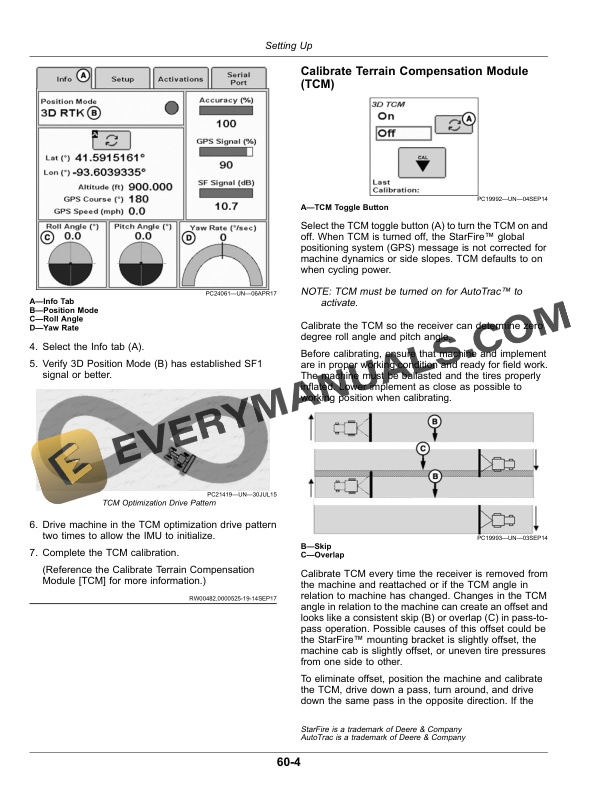
- 7.6. Optimize Terrain Compensation Module (TCM)
- 7.7. Calibrate Terrain Compensation Module (TCM)
- 7.8. AutoTrac ControllerRaven Calibration
- 7.9. AutoTrac ControllerRaven Machine Test
- 7.10. Basic Guidance Setup
- 8. OperatingAutoTrac ControllerRaven
- 8.1. Operating AutoTrac
- 8.2. AutoTrac Settings
- 8.3. Automatic Guidance System Detected
- 8.4. AutoTrac Status Pie
- 8.5. Requirements to Enable AutoTrac
- 8.6. Enable AutoTrac
- 8.7. Activating System
- 8.8. Deactivating System
- 9. OperatingOptimizing AutoTrac ControllerRaven
- 9.1. Advanced AutoTrac SettingsGreenStar 3 2630 Display
- 9.2. Advanced AutoTrac SettingsGreenStar 2 1800 Display
- 9.3. Optimize AutoTrac Controller Performance
- 9.4. Monitor AutoTrac Performance
- 9.5. Optimize AutoTrac Performance
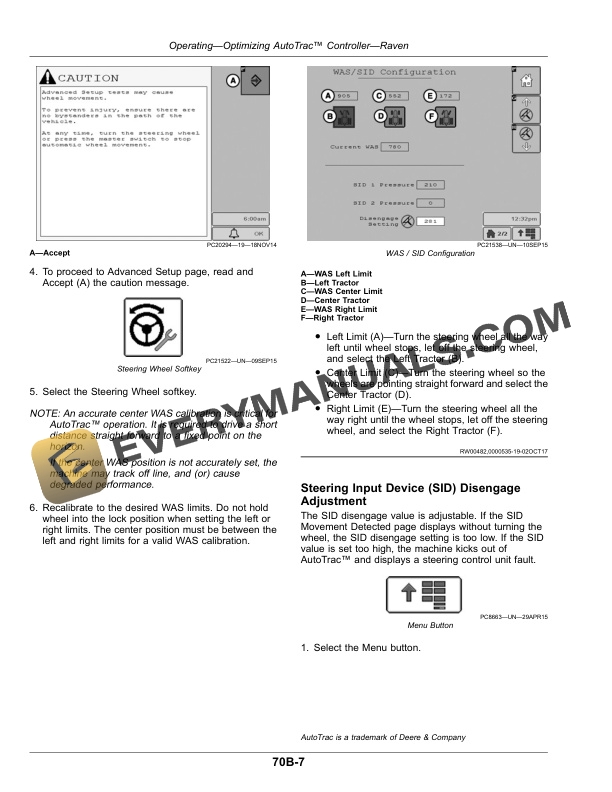
- 9.6. Wheel Angel Sensor (WAS) Calibration
- 9.7. Steering Input Device (SID) Disengage Adjustment
- 10. Troubleshooting
- 10.1. Troubleshooting
- 10.2. TroubleshootingRaven Steering Controller
- 10.3. AutoTrac Controller Health Test
- 10.4. Observable Symptoms
- 10.5. AutoTrac Controller Diagnostic Readings
- 10.6. AutoTrac Status Pie Diagnostic Readings
- 10.7. AutoTrac ControllerRaven System Information
- 10.8. AutoTrac ControllerRaven Stop Codes
- 10.9. AutoTrac Exit Codes and Deactivation Messages
- 10.10. Guidance Alarms
- 10.11. AutoTrac ControllerRaven Diagnostic Addresses
- 10.12. AutoTrac ControllerRaven Diagnostic Trouble Codes (DTC)
- 11. Maintenance
- 11.1. Preseason Checklist
- 11.2. Postseason Checklist
- 11.3. Daily Checklist
- 12. John Deere Service Literature Available
- 12.1. Technical Information
- 13. John Deere Service Keeps You On Job
- 13.1. John Deere Is At Your Service
Related products
-50%

Original price was: $20.$10Current price is: $10.
-50%

Original price was: $20.$10Current price is: $10.


-50%

Original price was: $20.$10Current price is: $10.
-50%

Original price was: $20.$10Current price is: $10.
-50%

Original price was: $20.$10Current price is: $10.