
John Deere Machine Sync Operator Manual OMPFP18250
$30
- Type Of Manual: Operator Manual
- Manual ID: OMPFP18250
- Format: PDF
- Size: 2.5MB
- Number of Pages: 52
Description
-
Model List:
- Machine Sync
- 1. Introduction
- 1.1. Foreword
- 1.2. John Deere Technical Information Bookstore
- 1.3. Recognize Safety Information
- 1.4. Understand Signal Words
- 1.5. Follow Safety Instructions
- 1.6. Practice Safe Maintenance
- 1.7. Use Steps and Handholds Correctly
- 1.8. Handle Electronic Components and Brackets Safely
- 1.9. Use Electronic Display Properly
- 1.10. Operate Guidance Systems Safely
- 1.11. Use Seat Belt Properly
- 1.12. Prevent Electrical Shock and Fires
- 1.13. Avoid Exposure to High Radio Frequency Fields
- 1.14. Avoid Electrical Power Lines
- 1.15. Machine Sync Audible Tones
- 2. Regulatory and Compliance Information
- 2.1. EU Declaration of Conformity
- 3. System Overview
- 3.1. Theory of Operation
- 3.1.1. Machine Sync Automation
- 3.1.2. Machine Sync Shared Data
- 3.2. Machine Sync Automation Compatibility
- 3.3. Machine Sync Shared Data Compatibility
- 3.4. Machine Sync Activation
- 4. Setting UpConfiguring Machine Communication Radio Network
- 4.1. Set Up Network
- 4.2. Manage Networks
- 4.3. Wired Network Connection Lost
- 4.4. Wireless Network Connection Lost
- 5. Setting UpConfiguring Machine Sync AutomationLeader (Combine)
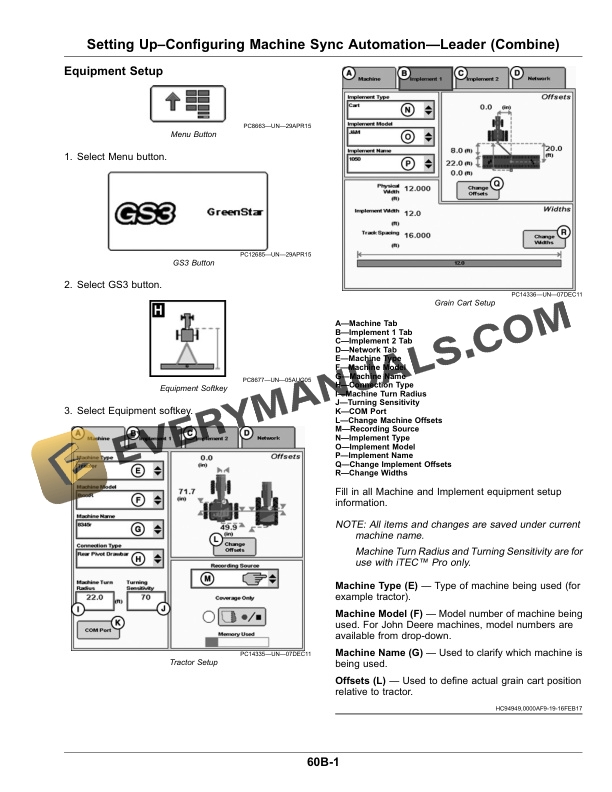
- 5.1. Equipment Setup
- 5.2. Guidance Settings
- 6. Setting UpConfiguring Machine Sync AutomationFollower (Tractor)
- 6.1. Equipment Setup
- 6.2. Guidance Settings
- 7. Setting UpConfiguring Machine Sync Automation Home Pages
- 7.1. Setting Up Home Pages
- 8. OperatingMachine Sync Automation
- 8.1. Operating Machine Sync AutomationGuidance Mode
- 8.1.1. Straight Track
- 8.1.2. AB Curve
- 8.1.3. Adaptive Curves
- 8.1.4. Circle Track
- 8.2. Operating Machine Sync AutomationLeader (Combine)
- 8.2.1. Leader (Combine)Inactive
- 8.2.2. Leader (Combine)Ready
- 8.2.3. Machine Sync AutomationAcquire
- 8.2.4. Leader (Combine)Tracking
- 8.3. Operating Machine Sync AutomationFollower (Tractor)
- 8.3.1. Follower (Tractor)Inactive
- 8.3.2. Follower (Tractor)Ready
- 8.3.3. Follower (Tractor)Acquire
- 8.3.4. Follower (Tractor)Tracking
- 8.4. Home Point Calibration
- 8.5. Nudging
- 8.6. Request Unload Leader
- 8.7. Unload Request Follower
- 9. Setting UpConfiguring Machine Sync Shared Data
- 9.1. Set Up Resources
- 9.2. Set Up Machine Sync Shared Data
- 9.3. Share Map Coverage
- 10. OperatingMachine Sync Shared Data
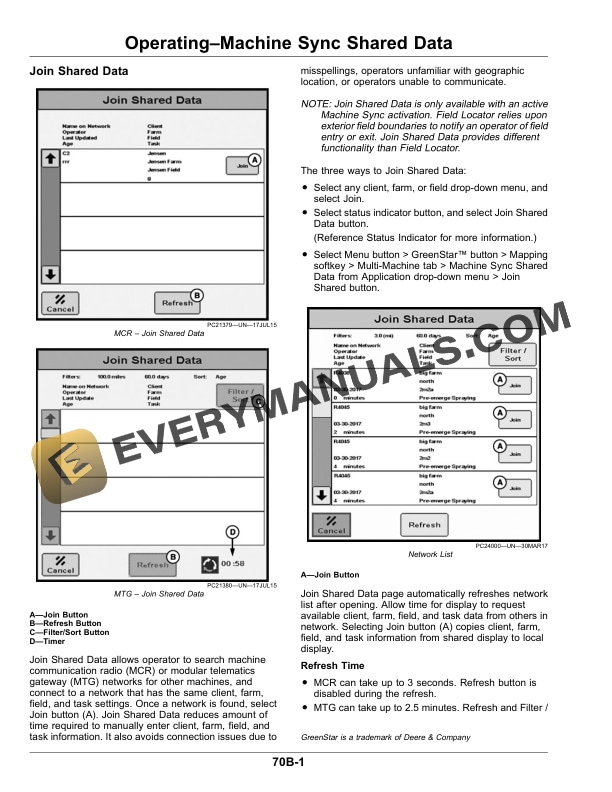
- 10.1. Join Shared Data
- 10.2. Status Indicator
- 10.3. Layout Manager
- 10.4. Clear Shared Coverage Maps
- 10.5. Share Guidance Lines
- 10.5.1. Receiving a Guidance Line
- 11. Troubleshooting
- 11.1. Machine Sync Automation DiagnosticsLeader (Combine)
- 11.2. Machine Sync Automation DiagnosticsFollower (Tractor)
- 11.3. Machine Sync Shared Data Diagnostics
- 11.4. Troubleshooting
- 11.5. Diagnostic Trouble CodesArmrest Control Unit (ACU)
- 11.6. Diagnostic Trouble CodesCab Load Center (CLC)
- 12. John Deere Service Literature Available
- 12.1. Technical Information
- 13. John Deere Service Keeps You On The Job
- 13.1. John Deere Is At Your Service
Related products


-50%

Original price was: $20.$10Current price is: $10.
-50%

Original price was: $20.$10Current price is: $10.
-50%

Original price was: $20.$10Current price is: $10.
-50%

Original price was: $20.$10Current price is: $10.

-50%

Original price was: $20.$10Current price is: $10.