John Deere Active Implement Guidance Operator Manual OMPFP22557
$30
- Type Of Manual: Operator Manual
- Manual ID: OMPFP22557
- Format: PDF
- Size: 3.6MB
- Number of Pages: 80
Description
-
Model List:
- Active Implement Guidance
- 1. Introduction
- 1.1. Foreword
- 1.2. John Deere Technical Information Bookstore
- 1.3. Recognize Safety Information
- 1.4. Understand Signal Words
- 1.5. Follow Safety Instructions
- 1.6. Practice Safe Maintenance
- 1.7. Use Steps and Handholds Correctly
- 1.8. Handle Electronic Components and Brackets Safely
- 1.9. Use Electronic Display Properly
- 1.10. Operate Guidance Systems Safely
- 1.11. Use Seat Belt Properly
- 1.12. Operate Implement Automation Systems Safely
- 1.13. Avoid HighPressure Fluids
- 2. Regulatory and Compliance Information
- 2.1. Identify Date Code
- 2.2. Eurasian Economic Union EAC
- 2.3. EU Declaration of Conformity
- 2.4. UK Declaration of Conformity
- 3. System Overview
- 3.1. Theory of Operation
- 3.2. Requirements
- 3.2.1. Hardware
- 3.2.2. Software
- 3.3. Navigate to Application Controller Pages
- 3.4. Navigate to StarFire Pages
- 3.5. Enter Activation Code
- 3.6. Machine Compatibility
- 3.7. Replace Erasable Programmable Read Only Memory (EPROM)
- 4. Component Overview
- 4.1. StarFire Receiver
- 4.1.1. StarFire ReceiverShared Signal
- 4.2. Display
- 4.3. Wheel Angle Sensor
- 4.3.1. Install Requirements
- 4.4. Application Controller
- 4.5. Counterbalance Valve
- 4.6. External Valve
- 4.7. Implement Height Switch
- 4.8. AutoTrac Vision Camera
- 5. Assembly
- 5.1. Low Side Driver
- 6. Setting UpMachine and Implement
- 6.1. Connect Implement
- 6.2. Configure Implement StarFire Receiver
- 6.3. Optimize Terrain Compensation Module (TCM)
- 6.4. Calibrate Terrain Compensation Module (TCM)
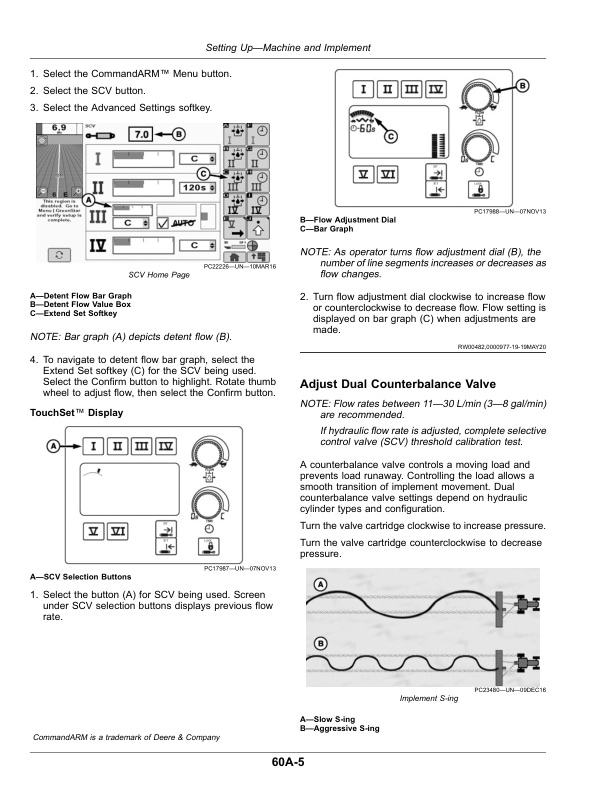
- 6.5. Adjust Selective Control Valve (SCV)
- 6.5.1. GreenStarGreenStar is a trademark of Deere Company 3 CommandCenter
- 6.5.2. TouchSet Display
- 6.6. Adjust Dual Counterbalance Valve
- 7. Setting UpUCC2 Application Controller
- 7.1. Setup Wizard Overview
- 7.2. GPS Offsets
- 7.3. Serial Ports
- 7.4. Set Up Run Page
- 8. Setting UpActive Implement Guidance
- 8.1. Steer ControlActive Implement Guidance
- 8.2. Steering CalibrationsActive Implement Guidance
- 8.3. Error CorrectionActive Implement Guidance
- 8.4. Speed ControlActive Implement Guidance
- 8.5. RowSense SettingsActive Implement Guidance
- 8.6. Automation OptionsActive Implement Guidance
- 8.7. Vision Guidance Camera CalibrationActive Implement Guidance
- 8.8. Implement TrackingActive Implement Guidance
- 8.9. Steering SensitivityActive Implement Guidance
- 9. Setting UpTractor Integrated Active Implement Guidance
- 9.1. Tractor Integrated Active Implement Guidance Overview
- 9.2. Set Up Active Implement Guidance for Tractor Integrated Active Implement Guidance
- 10. Setting UpPlow Steer
- 10.1. Width ControlPlow Steer
- 10.2. Manual SCV CalibrationPlow Steer
- 10.3. Plow ConfigurationPlow Steer
- 10.4. Operation SetupPlow Steer
- 10.5. Calibrate Width ControlPlow Steer
- 10.6. Width Control TestPlow Steer
- 11. Operating
- 11.1. Basic Operation Overview
- 11.2. Engage Implement Automation
- 11.3. Disengage, Deactivate, and Disable Implement Automation
- 11.4. SCV Command Control
- 11.5. AutoTrac Vision Overlay
- 12. Troubleshooting
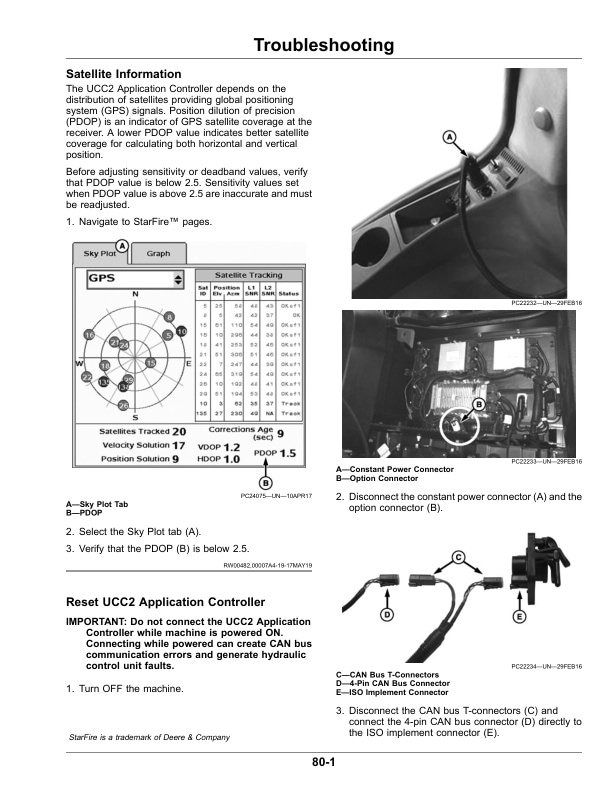
- 12.1. Satellite Information
- 12.2. Reset UCC2 Application Controller
- 12.3. Status Code, Navigation Source, and Exit Code
- 12.4. Diagnostic Trouble Codes (DTCs)
- 12.5. Diagnostics
- 12.6. Step ResponseActive Implement Guidance
- 12.7. Frequency SweepActive Implement Guidance
- 12.8. Position CommandActive Implement Guidance
- 12.9. Flow CommandActive Implement Guidance
- 12.10. Navigation SensorsActive Implement Guidance
- 12.11. Speed ControlActive Implement Guidance
- 12.12. DiagnosticsPlow Steer
- 12.13. Hardware/Software
- 12.14. SCV Diagnostics
- 12.15. Input/Output Readings
- 12.16. Machine Configuration
- 12.17. External Valve
- 12.18. Receiver
- 12.19. AutoTrac Vision Camera
- 12.20. Implement PerformanceActive Implement Guidance
- 12.21. Implement PerformancePlow Steer
- 13. Maintenance
- 13.1. Machine
- 13.2. Preseason Checklist
- 13.3. Daily Checklist
- 13.4. Postseason Checklist
- 14. John Deere Service Literature Available
- 14.1. Technical Information
- 15. John Deere Service Keeps You on The Job
- 15.1. John Deere Is At Your Service
Related products

-50%

Original price was: $20.$10Current price is: $10.
-50%

Original price was: $20.$10Current price is: $10.


-50%

Original price was: $20.$10Current price is: $10.
-50%

Original price was: $20.$10Current price is: $10.