John Deere iTEC Pro Operator Manual OMPFP14700
$30
- Type Of Manual: Operator Manual
- Manual ID: OMPFP14700
- Format: PDF
- Size: 2.6MB
- Number of Pages: 96
Description
-
Model List:
- iTEC Pro
- 1. Contents
- 1.0.1. Recognize Safety Information
- 1.0.2. Understand Signal Words
- 1.0.3. Follow Safety Instructions
- 1.0.4. Practice Safe Maintenance
- 1.0.5. Use Steps and Handholds Correctly
- 1.0.6. Handle Electronic Components and Brackets Safely
- 1.0.7. Operate Guidance Systems Safely
- 1.0.8. Use Seat Belt Properly
- 1.0.9. Operating the Tractor Safely
- 1.0.10. Operate Implement Automation Systems Safely
- 1.0.11. Avoid HighPressure Fluids
- 1.1. Safety Signs
- 1.1.1. Approaching Impassable Boundary
- 1.2. Introduction
- 1.2.1. Theory of Operation
- 1.2.2. To Make iTEC Pro Operate
- 1.2.3. iTEC Pro Setup Checklist
- 1.2.4. iTEC Pro Activation
- 1.2.5. Getting Started
- 1.2.6. Useful Buttons
- 1.2.7. iTEC Pro Setup Flowchart
- 1.2.8. Advanced Setup Tool
- 1.3. Machine and Implement Setup
- 1.3.1. Machine Setup
- 1.3.2. Implement Setup
- 1.4. Boundary Setup
- 1.4.1. Boundary Type Description
- 1.4.2. Boundaries Tab
- 1.4.3. Boundaries Screen
- 1.4.4. Boundary Type
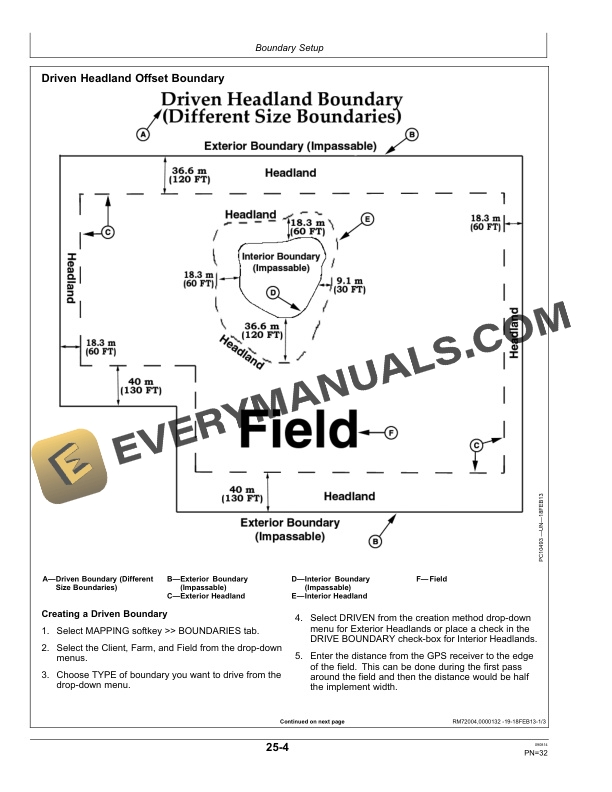
- 1.4.5. Driven Headland Offset Boundary
- 1.4.6. Top and Bottom Offsets Boundary
- 1.4.7. Constant Offset Boundary
- 1.5. Sequences
- 1.5.1. Sequences
- 1.5.2. Setup Sequences
- 1.5.3. Create or Edit Sequences
- 1.5.4. Setup Sequence Example
- 1.5.5. Sequence Learning
- 1.5.6. Associating Sequences to Boundaries
- 1.5.7. End Turn Offset
- 1.6. Turn Patterns and Types
- 1.6.1. iTEC Pro Settings Screen
- 1.6.2. Turn Patterns and Types
- 1.6.3. Number of Skipped Tracks
- 1.6.4. Simple Turn
- 1.6.5. Extended Turn
- 1.6.6. Light Bulb Turn
- 1.6.7. Skip and Fill
- 1.6.8. Alternate Rows
- 1.6.9. First Turn Skip
- 1.7. Skips and Overlap
- 1.7.1. Minimize Skips or Overlap
- 1.8. Home Pages
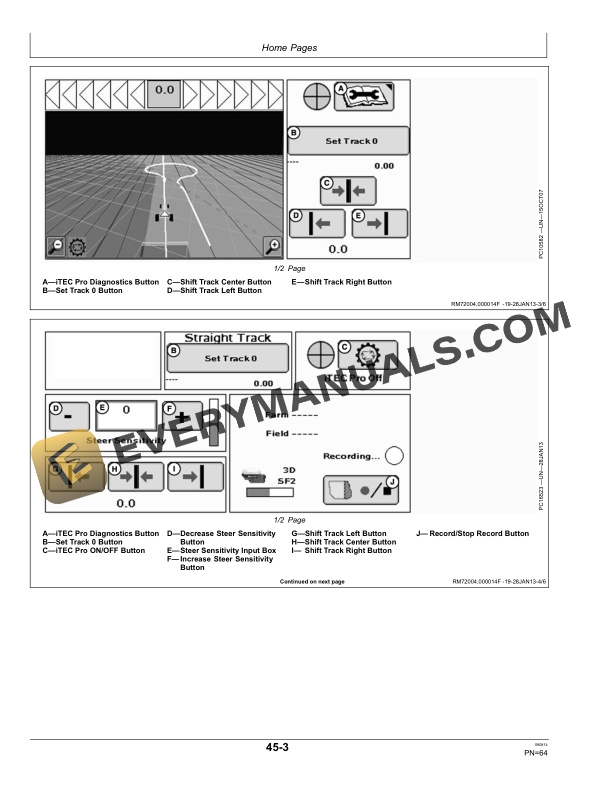
- 1.8.1. Home Pages
- 1.9. Operation
- 1.9.1. Turning Offsets
- 1.9.2. iTEC Pro Status Indicator (Pie Icon)
- 1.9.3. iTEC Pro Operation
- 1.9.4. Diagnostics
- 1.9.5. Diagnostic Pages
- 1.9.6. End Turns
- 1.9.7. Approaching Impassable Boundary
- 1.9.8. Deactivating iTEC Pro
- 1.9.9. Helpful Tips and Adjustments
- 1.9.10. Overlapping Boundary and Sequence Priority
- 1.10. Troubleshooting
- 1.10.1. Troubleshooting and Optimization Guide
- 1.10.2. Exit Codes
- 1.11. John Deere Service Literature Available
- 1.11.1. Technical Information
- 1.12. John Deere Service Keeps You on The Job
- 1.12.1. John Deere Is At Your Service
- 2. Page Number
- 2.1. Section 05
- 2.2. Section 10
- 2.3. Section 15
- 2.4. Section 20
- 2.5. Section 25
- 2.6. Section 30
- 2.7. Section 35
- 2.8. Section 40
- 2.9. Section 45
- 2.10. Section 50
- 2.11. Section 55
Related products
-50%

Original price was: $20.$10Current price is: $10.
-50%

Original price was: $20.$10Current price is: $10.

-50%

Original price was: $20.$10Current price is: $10.
-50%

Original price was: $20.$10Current price is: $10.
-50%

Original price was: $20.$10Current price is: $10.

-50%

Original price was: $20.$10Current price is: $10.