John Deere Autonomous Mower MOWiT 500F Operator Manual OMSAU13608
$30
- Type Of Manual: Operator Manual
- Manual ID: OMSAU13608
- Format: PDF
- Size: 0.9MB
- Number of Pages: 36
Description
-
Model List:
- Autonomous Mower MOWiT 500F
- 1. Introduction
- 1.1. Thank You for Purchasing a John Deere Product
- 1.2. Using Your Operators Manual
- 1.3. Machine Use
- 1.4. Special Messages
- 2. Contents
- 3. Product Identification
- 3.1. Record Identification Numbers
- 3.2. Type or Serial Number Plate Information
- 3.3. Declaration of Conformity
- 4. Safety Labels
- 4.1. Safety Label Locations
- 4.2. Understanding The NoText Machine Safety Labels
- 4.3. READ OPERATORS MANUAL BEFORE SERVICING
- 4.4. KEEP A SAFE DISTANCE, NO RIDERS
- 4.5. AVOID DANGER FROM ROTATING BLADE
- 4.6. Training
- 4.7. Operation
- 4.8. Maintenance and Storage
- 4.9. Checking Mowing Area
- 4.10. Stopping Safely
- 4.11. Rotating Blades are Dangerous Protect Children and Prevent Accidents
- 4.12. Wear Appropriate Clothing
- 4.13. Electrical Hazards
- 4.14. Handling Waste Product and Chemicals
- 5. Operating Controls
- 5.1. Controls and Features
- 6. Operating
- 6.1. Operating Checklist
- 6.1.1. Before First Use
- 6.1.2. Monthly
- 6.2. Using the Control Panel
- 6.2.1. A Mow on Schedule (AUTO) Button
- 6.2.2. B Mow Now Button
- 6.2.3. C Go Home Button
- 6.2.4. D Run LED
- 6.2.5. E Start Button
- 6.2.6. F Enter Button
- 6.2.7. G Up Arrow Button
- 6.2.8. H Left Arrow Button
- 6.2.9. I Right Arrow Button
- 6.2.10. J Down Arrow Button
- 6.2.11. K Back Button
- 6.2.12. L Menu Button
- 6.2.13. User Interface Display Information
- 6.2.14. A Time
- 6.2.15. B Boundary Sensor Location Indicator
- 6.2.16. C Battery Charge Icon
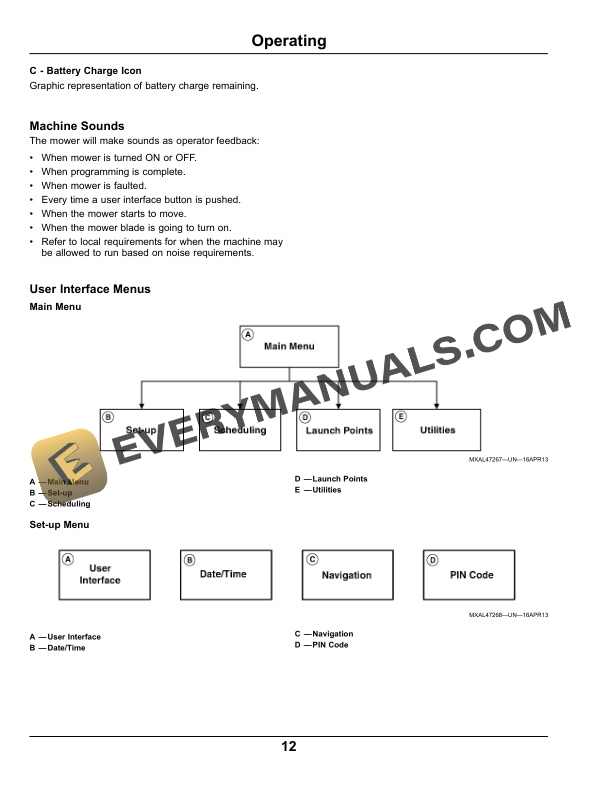
- 6.3. Machine Sounds
- 6.4. User Interface Menus
- 6.4.1. Main Menu
- 6.4.2. Setup Menu
- 6.4.3. Utilities Menu
- 6.4.4. Launch Points Menu
- 6.5. Testing Safety Systems
- 6.5.1. Testing Stop Button Function
- 6.5.2. Testing Handle Presence Function
- 6.6. Starting and Stopping the Mower
- 6.6.1. Starting Mower
- 6.6.2. Stopping Mower
- 6.7. Emergency Stopping
- 6.8. Using PIN Code
- 6.8.1. Entering PIN Code
- 6.9. Operating the Mower
- 6.10. Schedule Mowing
- 6.10.1. Mow on Schedule (AUTO) Mode
- 6.10.2. Mow Now Mode
- 6.10.3. Go Home Mode
- 6.11. Programming Mow On Schedule Mode
- 6.12. Using Setup Menu on User Interface
- 6.12.1. User Interface Menu
- 6.12.2. Date/Time Menu
- 6.12.3. Navigation Menu
- 6.12.4. Boundary Following
- 6.12.5. Boundary CleanUp Pass Menu
- 6.12.6. Keep Out Settings Menu
- 6.12.7. PIN Code Menu
- 6.13. Using Utilities Menu on User Interface
- 6.13.1. Diagnostics Menu
- 6.13.2. Replacement Parts Menu
- 6.13.3. System Info Menu
- 6.13.4. Mower Storage Menu
- 6.14. Using Launch Points Menu on User Interface
- 6.15. Adjusting Cutting Height
- 6.16. Using Fault Codes
- 6.16.1. Viewing Fault Codes
- 6.16.2. Clearing Fault Codes
- 6.17. Transporting Mower
- 6.17.1. Transporting in Vehicle
- 7. Service
- 7.1. Checking Boundary Wires
- 7.2. Cleaning the Mower
- 7.3. Servicing the Mower Blades
- 7.3.1. Checking Mower Blade Condition
- 7.4. Servicing the Battery
- 7.5. Preparing for Winter Storage
- 8. Service Miscellaneous
- 8.1. Fact Sheet for Product Safety
- 8.1.1. Manual for LithiumIon Battery for Autonomous Mower
- 9. Troubleshooting
- 9.1. Using Troubleshooting Chart
- 9.2. Autonomous Mower
- 9.3. Fault and Warning Codes
- 9.3.1. Fault Codes
- 9.3.2. Warning Codes
- 10. Specifications
- 10.1. Autonomous Mower
- 10.1.1. Dimensions
- 11. Service Statement
- 11.1. SABO Parts
- 11.2. The Right Tools
- 11.3. WellTrained Technicians
- 11.4. Prompt Service
Related products

-50%

Original price was: $20.$10Current price is: $10.
-50%

Original price was: $20.$10Current price is: $10.
-50%

Original price was: $20.$10Current price is: $10.
-50%

Original price was: $20.$10Current price is: $10.
-50%

Original price was: $20.$10Current price is: $10.
-50%

Original price was: $20.$10Current price is: $10.